Handover that arrives complete.
For the document controller who owns the record: validate every package against a manifest, issue transmittals that track themselves, and run change requests that hold, forward, and close on an audit log you never have to write. The as-constructed set arrives complete, and stays that way.
The file you need is the one that never arrived.
Handover is where the record breaks. The set comes in over email, nobody checks it against what was promised, and the gap goes unnoticed until the day it matters.
Handover runs through Lunr, so the missing file is caught on upload, and the transmittal that proves what was sent is kept, not lost with the person who sent it.
- The contractor signs off at practical completion. The as-constructed set is meant to follow.01
- Half the files arrive. Nothing checks them against a manifest, so nobody notices what is missing.02
- The gap surfaces two years later, in an audit, when the one drawing you need is the one that never came.03
- The proof of what was issued is an email thread, sent by someone who has since left.04
Every package checked before it enters the record.
A handover package is built and validated against a manifest, so a missing file is caught on upload. Title-block tags are read from the drawing itself and applied as metadata, so nobody retypes them.
- Build a package and validate it against a manifest, so a missing file is caught on upload, not in an audit.
- Read title-block tags from the drawing and apply them as metadata automatically.
- Validate drawings and models for title blocks, XREFs, styles, and missing fonts before they enter the record.
package build and validation · manifest check · title-block tag parsing · drawing and model validation · ZIP archive
read from the drawing
- discipline
- Electrical
- drawing no
- AW-EL-DR-0140
- rev
- C
- sheet
- 12 of 48
Issue a transmittal. Track what happens next.
Generate a cover sheet that lists exactly what was issued, then track the transmittal through sent, received, and acknowledged. The record of who received what, and when, is kept for you.
- Generate a transmittal cover sheet as a PDF, listing exactly what was issued.
- Track every transmittal through sent, received, and acknowledged.
- Keep a record of who received which documents, and when, for the audit.
transmittal list · generated cover sheets (PDF) · sent · received · acknowledged · tracked with timestamps
- M. Nguyenhead contractoracknowledged
- P. Adeyemiservices engineeracknowledged
2 of 2 recipients acknowledged · logged with a timestamp
Change requests that hold, forward, and close themselves into the record.
A change request is where handover gets decided. Put it on hold while a survey comes back, forward it to the right discipline, nominate a reviewer, and attach a package of documents. Every move writes itself to the audit log, so the record is complete before anyone asks for it.
holds · forwards · reviewer nomination · change request packages · bulk import · create from a collection · dashboards and stats
- reviewer
- R. Okafor
- package
- 3 documents
- 13:40openedA. Chen
- 13:44reviewer nominatedR. Okafor
- 14:02hold appliedawaiting survey
- 15:20hold releasedsurvey received
- 15:22package attached3 documents
- 16:05forwardedstructural
- 16:41approvedR. Okafor
Put a change request on hold while you wait on information, then release it, with both logged.
Forward a change request to the right reviewer or discipline without losing the thread.
Nominate reviewers per change request, or configure who reviews what by default.
Attach a package of documents to a change request, so the review has everything it needs.
Import change requests in bulk to bring an existing backlog under control.
Raise a change request from a collection of documents in one step.
Track open, held, and closed change requests with dashboards and activity stats.
Set your own change request number formats to match your existing register.
Save change request views as favourites, and share the list with your team.
Raise a change request from a markup.
A reviewer marks up a drawing in the viewer, and turns the redline straight into a change request or an RFI, so the question and the document that raised it stay together.
See projects and RFIs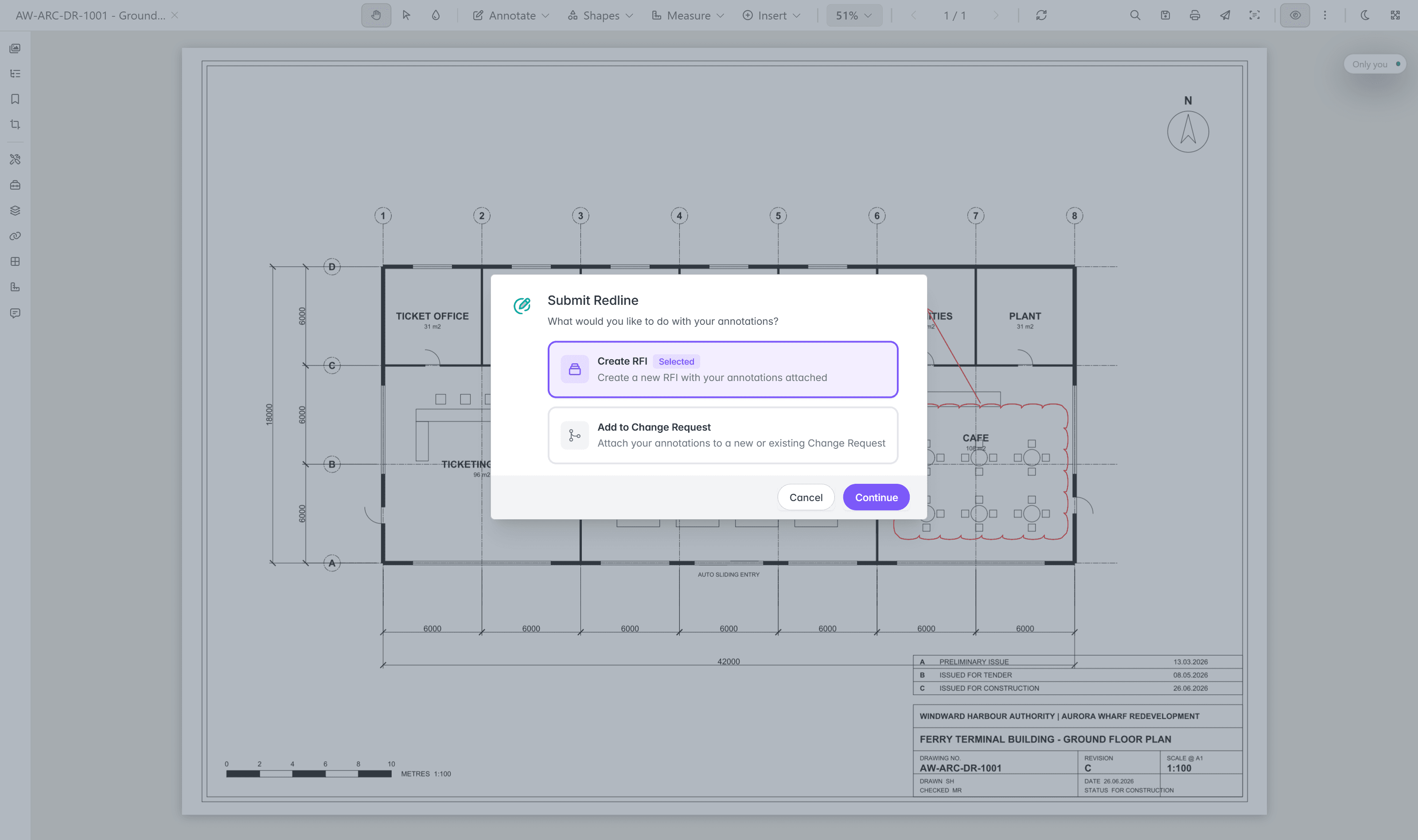
Handover runs inside the project.
Change requests, transmittals, and RFIs run in project spaces, where your team are Users and contractors join as Collaborators who see only what you grant them. When the project ends, the record stays with the asset.
Questions teams ask about handover.
How package validation, transmittals, and change requests keep the record complete.
- What does handover through Lunr do?
- Handover runs through Lunr so the as-constructed set arrives complete and stays that way. Validate every package against a manifest, so a missing file is caught on upload rather than in an audit two years later. Issue transmittals that track themselves, and run change requests that hold, forward, and close on an audit log you never have to write.
- How does package validation catch a missing file?
- A handover package is built and validated against a manifest, so a missing file is caught on upload, not in an audit. Title-block tags are read from the drawing itself and applied as metadata, so nobody retypes them. Lunr also validates drawings and models for title blocks, XREFs, styles, and missing fonts before they enter the record.
- What is a transmittal, and what does Lunr track?
- A transmittal is the controlled issue of documents to another party. Lunr generates a cover sheet as a PDF listing exactly what was issued, then tracks the transmittal through sent, received, and acknowledged. The record of who received which documents, and when, is kept for you with timestamps, so the proof is not an email thread sent by someone who has since left.
- What can a change request do?
- A change request can be put on hold while you wait on information, forwarded to the right reviewer or discipline, and closed, with every move written to the audit log. Nominate reviewers per change request, attach a package of documents, import change requests in bulk, or raise one from a collection. Dashboards and stats track open, held, and closed change requests, and you can set your own number formats to match your existing register.
- Can I raise a change request from a drawing markup?
- Yes. A reviewer marks up a drawing in the viewer and turns the redline straight into a change request or an RFI, so the question and the document that raised it stay together.
- Who can access handover documents, and what happens when the project ends?
- Change requests, transmittals, and RFIs run in project spaces, where your team are Users and contractors join as Collaborators who see only what you grant them. When the project ends, the record stays with the asset, so the as-constructed set, the transmittals, and the change request history remain under control.
Take handover that arrives complete.
Book a walkthrough with someone who knows what a transmittal, a change request, and an as-constructed set are, and see the audit log write itself.
10M+ documents under management · Hosted in Australia and the US · SAML · Full audit trail · Export anytime
- entity
- Lunr Labs Pty Ltd
- location
- Melbourne AU
- workspace
- documents.lunr.app
- rev
- 2026