An Autodesk Docs alternative for the operations phase.
For the asset owners and document controllers who keep the drawing record after the project closes. Put every DWG, RVT, DGN, and MicroStation drawing under revision control, in a record built for the operating life of the asset. Keep Autodesk Docs for live project delivery.
10M+ documents under management · Hosted in Australia and the US · SAML · Full audit trail
Autodesk Docs is built for the project, and it does that well.
Autodesk Docs, now part of Autodesk Forma, runs design coordination and construction delivery inside the Autodesk stack, and plenty of teams should keep it for that. The claim here is narrow. A project common data environment is the wrong shape for the operations phase, when the project has closed and the asset has decades of life left.
Lunr is built for the operating record. It holds the controlled drawing set for the life of the asset, while Autodesk Docs runs the live projects, so handover has somewhere permanent to land.
Read why owners keep the operating record off project tools- Live project delivery and design coordination, inside the Autodesk stack.
- Model coordination and clash detection with Revit and Navisworks.
- Construction-phase RFIs, submittals, and issues while the job is running.
- Teams already on the AEC Collection, working project by project.
Where an operating asset hits the edge of a project CDE.
These are the specific points where a project common data environment stops matching what an asset owner needs after handover. Each one is a job the operations phase requires and a project tool was never meant to do.
Autodesk Docs and Lunr, capability by capability.
A factual read of what each tool does for the drawing record. The two are not rivals for every row. Autodesk Docs runs the live project, and Lunr holds the operating record for the life of the asset.
| Capability | On Autodesk Docs | On Lunr |
|---|---|---|
| Live design coordination during the build | Yes, its core strength | The operating record, after handover |
| Store and version DWG and RVT | Yes, Autodesk-native | Yes, and format-neutral |
| First-class DGN and MicroStation, alongside DWG and RVT | Autodesk formats come first | Yes, DGN and DWG treated the same |
| A permanent record for the operating asset | No, project-scoped and archived at closeout | Yes, built for the operating life of the asset |
| A controlled register across the whole estate | No, scoped to one project | Yes, a register over every asset |
| Full file history travels with the drawing | Portal download does not preserve full history | Yes, revision history and audit trail stay with the record |
| Read the record without a per-seat CDE licence | Per seat, metered by activated access | Yes, view drawings with no CAD or CDE seat |
| Full-text search inside scanned legacy drawings | No, indexes names and metadata | Yes, XRAY OCR reads the text on the sheet |
| Record survives the end of a project subscription | Short grace period, then data may be deleted | Yes, the record is yours, held independently |
A register across the estate, not a project that gets archived.
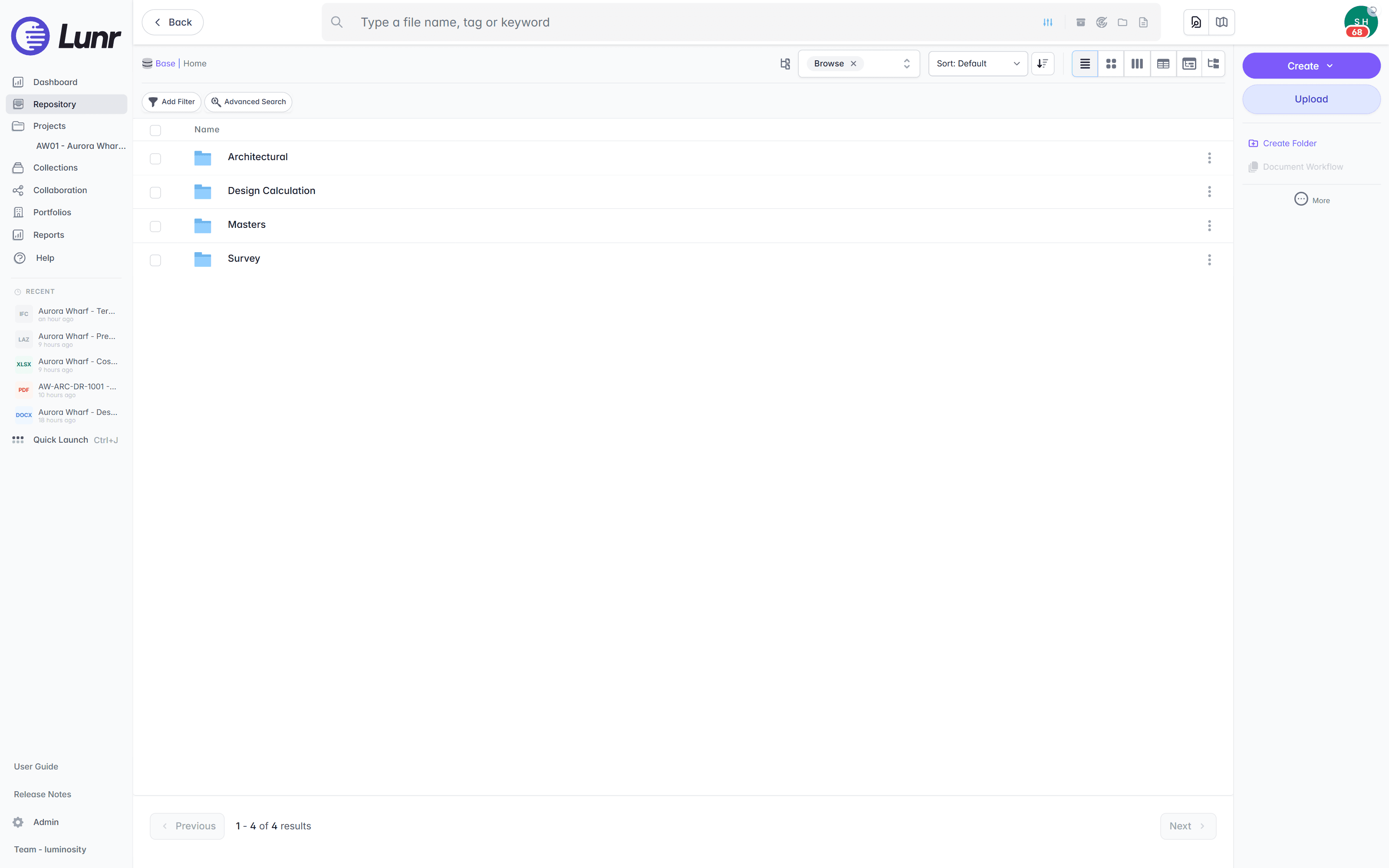
Book a drawing in and Lunr numbers it, keeps its full revision history, and marks the previous revision as superseded. The register runs across every asset you hold rather than one project, and the title-block fields come across as searchable metadata, so drawing number, revision, and discipline are things you filter on for the whole estate.
- A controlled register across every asset, showing the current revision and status of each sheet at a glance.
- Automatic document and version numbering, applied in your register format as drawings are booked in.
- Superseded revisions kept and marked, so an archived project never buries the current sheet.
- Title-block tags read into metadata, so drawing number, revision, and discipline become filters across the estate.
estate register · automatic numbering · superseded marking · title-block metadata
See document control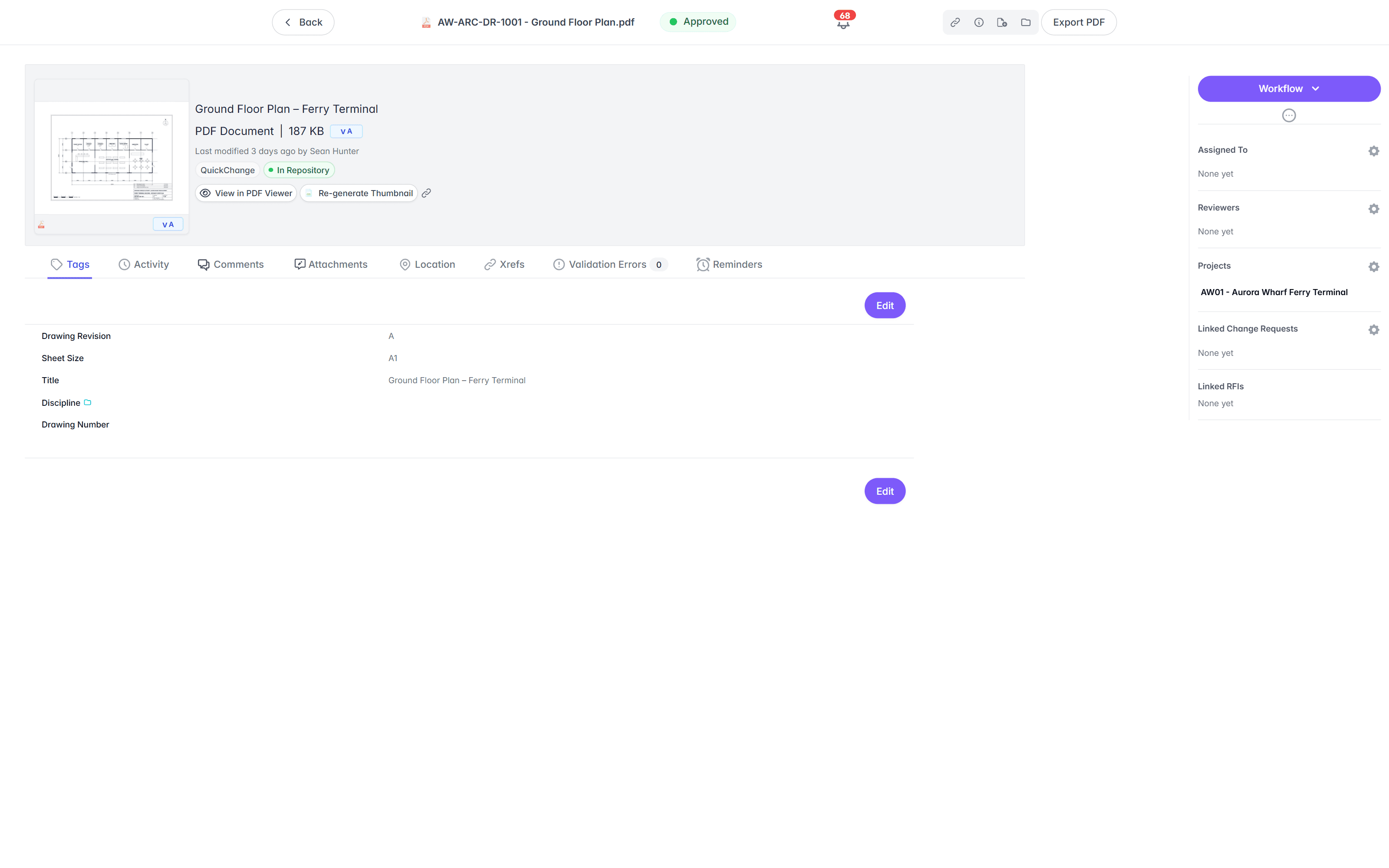
Open DGN and MicroStation alongside DWG and RVT, no CAD licence.
A CDE built on the Autodesk stack centres Autodesk’s own DWG and RVT. Much rail, road, water, and utility design is drawn in MicroStation, so a large part of an owner’s estate is DGN that sits outside that native path. Lunr treats every format the same. The Rift viewer renders DWG, DGN, and PDF at full fidelity, with layers, measurement, and markup. Models open in Foundry, point clouds in Nimbus.
- View DWG, DGN, RVT, and PDF in the browser, with no CAD licence and nothing to install.
- DGN and MicroStation drawings are first-class, read and searched like any other format.
- Toggle layers, measure, and mark up the drawing straight in the viewer.
- Open BIM models in Foundry and point clouds in Nimbus from the same record.
browser viewers · DGN and DWG · layers · measurement · no CAD licence
Try the viewers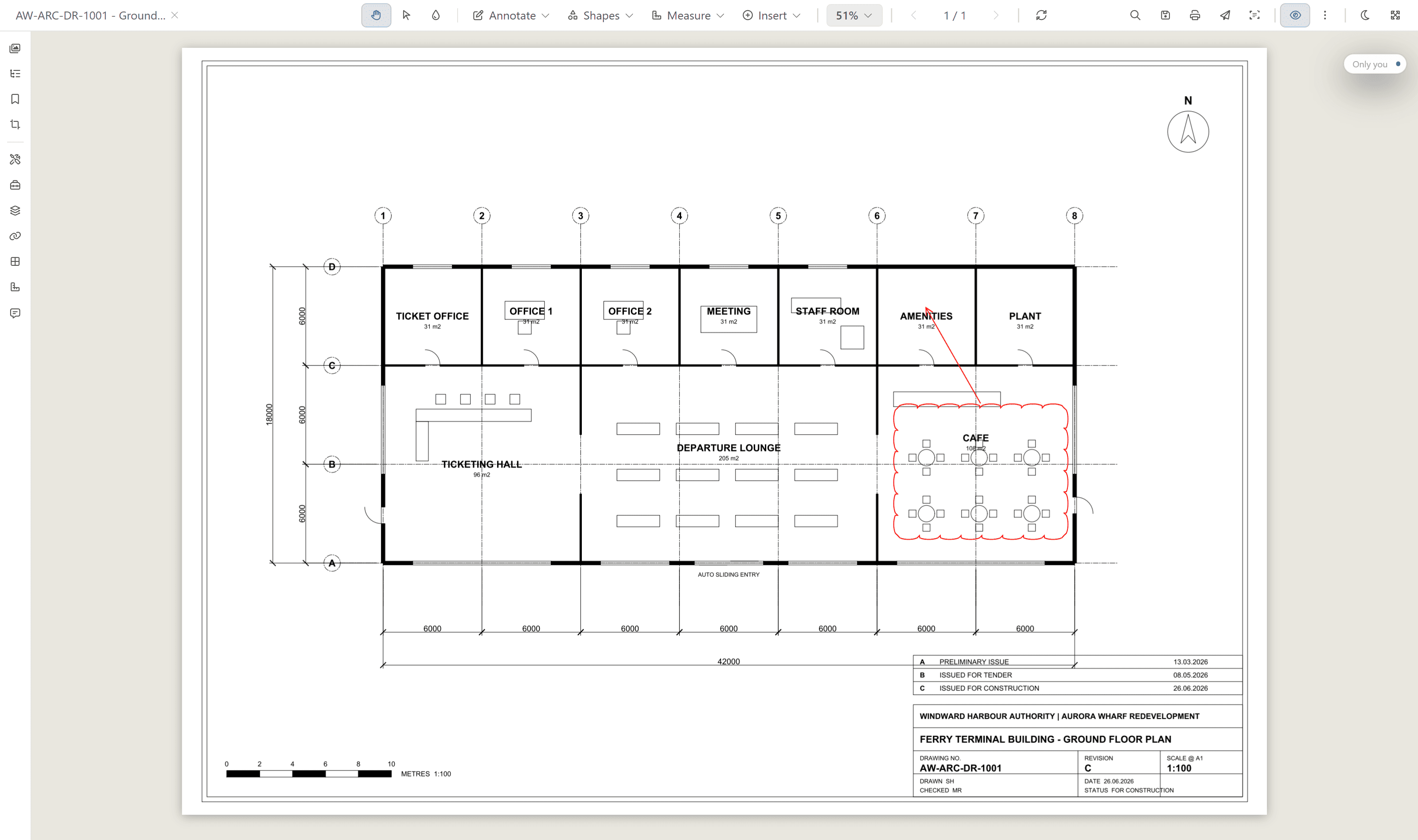
Search the words printed inside a scanned drawing.
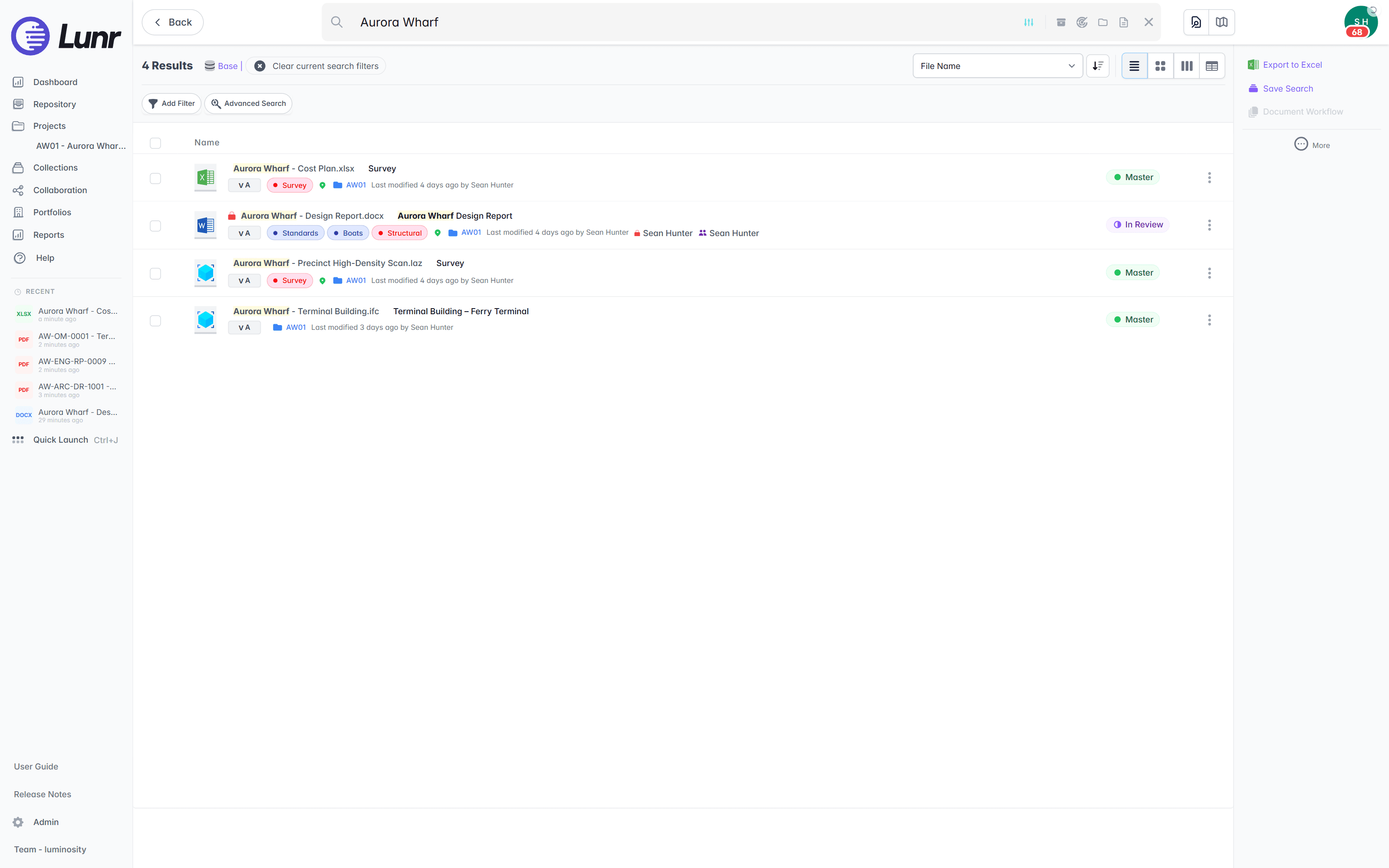
An operating asset carries decades of legacy drawings, many of them scans. A project CDE indexes file names and structured data, so the content of a scanned sheet is invisible to it. XRAY runs OCR and full-text search across every drawing, scans included. Search a valve tag, a title-block reference, or a note, and Lunr returns the sheet whether it was drawn this morning or scanned from a 1994 archive.
- OCR and AI full-text search across every DWG, DGN, RVT, PDF, and scanned image.
- Find a tag, a reference, or a note printed inside the drawing, not just the file name.
- Deep XRAY re-scans a dense sheet tile by tile, so nothing on the drawing is missed.
- Filter results by metadata, tags, and revision to narrow a large estate fast.
OCR · AI full-text search · deep XRAY tile re-scan · metadata and tag filters
Take handover on the record, with an audit trail behind it.
A project handover often arrives as a ZIP with the history left behind. Lunr validates each handover package against a manifest, so a missing as-constructed drawing is caught on upload, issues tracked transmittals for anything you send out, and keeps a full audit trail behind every approval, revision, and change on the operating record.
- Validate each handover package against a manifest, and read title-block tags into metadata.
- Issue tracked transmittals, and run change requests that hold, forward, and close.
- Move drawings through configurable review and approval workflows.
- Keep a full audit trail on every controlled drawing, ready for compliance and audit.
manifest validation · transmittals · change requests · configurable workflows · full audit trail
See handover and transmittals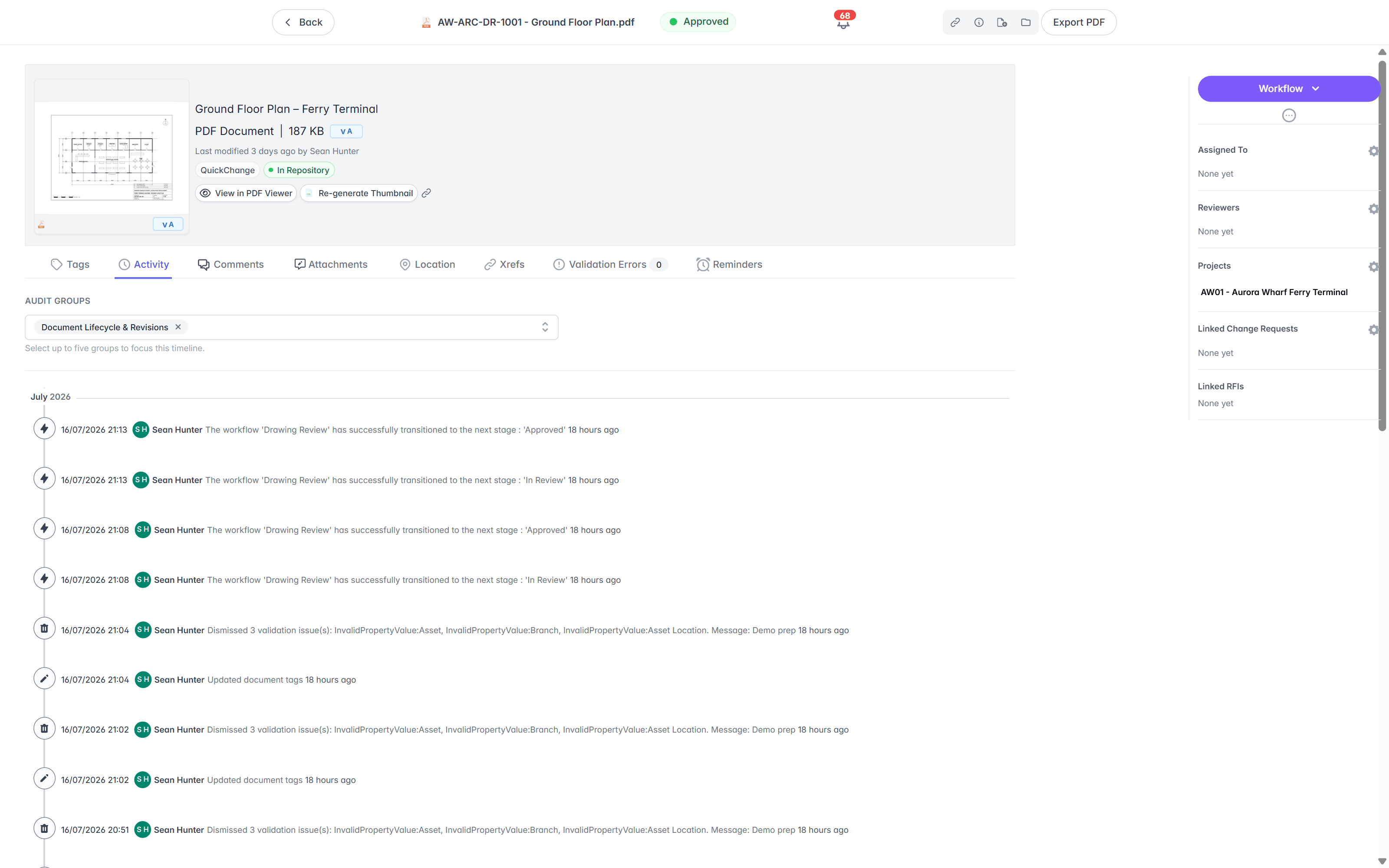
Move the operating record across, keep Autodesk for live projects.
You do not have to rebuild anything or stop delivering projects on Autodesk. Import the handover package, bring every format across together, keep the folders your team knows, and let each project hand its drawings to the operating record as it closes.
- 01Import the closeout package
Point Lunr at the handover export from Autodesk Docs, and it reads the title-block tags from each sheet into metadata, so drawing number, revision, and discipline become fields you can filter on, without the history staying locked on someone else's server.
- 02Bring every format across together
DGN and MicroStation land alongside DWG and RVT, treated the same. Nothing is downgraded for sitting outside the Autodesk formats, and title blocks are read from either.
- 03Keep the folders your team knows
Your existing folder structure comes across, so people find drawings where they expect, while the estate register gives the controlled view across every asset on top.
- 04Keep Autodesk for live projects
Run Autodesk Docs for design and construction, and Lunr for the operating record. When a project hands over, its drawings land in the asset record and stay there for the life of the asset.
See the CAD connector and the rest of the CAD, GIS, and facilities connectors on the connectors page.
Teams already run the operating record on Lunr.
Universities, utilities, energy companies, and government departments run their drawing record on Lunr, from project handover through the operating life of the asset.
documents under management on Lunr. Proof the operating record holds up at owner-and-portfolio scale.
“Lunr is a simple solution that provides the flexibility to develop the system to our needs. Lunr is simple to use, and minimal training is required.”
Questions owners ask about Autodesk Docs and the operating record.
What a project CDE can and cannot do once the job closes, and what it takes to hold the drawing record for the life of the asset.
- What is the best Autodesk Docs alternative for asset owners?
- Autodesk Docs, now part of Autodesk Forma, is built for live project delivery inside the Autodesk stack, and it runs the design and construction phase well. The gap opens at handover, because the tool is organised around a project that gets archived when the job closes, while the asset itself runs for decades. Asset owners move the operating record onto a purpose-built system that holds every drawing under revision control across the whole estate, treats DGN and MicroStation the same as DWG and RVT, and does not tie the record to a per-project subscription. Lunr is built for that operations phase and manages more than 10 million documents for owners today.
- Does Lunr handle DGN and MicroStation files as well as DWG and RVT?
- Yes, and that is the point of a format-neutral record. Much rail, road, water, and utility design is drawn in MicroStation, so a large part of an owner's estate is DGN. A CDE built on the Autodesk stack centres Autodesk's own DWG and RVT, and everything else sits outside the native path. Lunr treats DGN and DWG the same, opens both in the browser through the Rift viewer with no CAD licence, and reads title blocks from either into searchable metadata. The record follows the asset across every file format it holds.
- What happens to the drawing record when an Autodesk Construction Cloud project closes?
- The project is archived. That keeps the project list tidy, but it is the wrong shape for an operating asset, which needs a live record for its whole working life. Downloading the project through the Data Management web portal does not preserve the full file history, which stays on Autodesk's server, so the version story can be lost on the way out. If the subscription later ends, Autodesk gives a short grace period, after which the data may be deleted. An asset that runs for decades cannot have its drawing record tied to a project that gets archived and a subscription that can lapse.
- Can you keep Autodesk Docs for live projects and use Lunr for operations?
- Yes, and it is the common setup for owners who deliver capital projects. Keep Autodesk Docs for design coordination and construction while the job is running, and hand the completed drawings to Lunr as the permanent operating record. When a project closes, its as-constructed drawings land in the asset record under revision control and stay there. You run project delivery and the operating record side by side, each on the tool built for it.
- How do you move drawings out of Autodesk Docs, and does the history come with them?
- Import the handover package into Lunr. It reads the title-block tags from each sheet into metadata, so drawing number, revision, and discipline become searchable fields without retyping, and your folder structure comes across as it is. Because a web-portal download from Autodesk does not preserve full file history, the sooner you bring drawings onto a controlled record the more of the version story you keep. From then on Lunr holds the full revision history and a complete audit trail on every drawing, and the record is held independently of any project subscription.
- Do operations staff need an Autodesk seat to view drawings in Lunr?
- No. In Autodesk Docs, access is per seat and metered by activated access, which is a poor fit for an operations team that only needs to read the record. In Lunr the whole team opens DWG, DGN, RVT, and PDF drawings in the browser through the Rift viewer, with layers, measurement, and markup, and no CAD or CDE seat. A licence is only needed to author drawings, not to read the record of the asset you operate.
Keep Autodesk for projects. Give the asset a record.
Book a walkthrough with someone who knows what a transmittal, a DGN, and an as-constructed drawing are, and watch Lunr run against a set of your own.
10M+ documents under management · Hosted in Australia and the US · SAML · Full audit trail · Export anytime
- entity
- Lunr Labs Pty Ltd
- location
- Melbourne AU
- workspace
- documents.lunr.app
- rev
- 2026