An M-Files alternative that already knows what a drawing revision is.
For the asset owners and document controllers who hold the record once a drawing is issued. Drawing numbers, revisions, and title-block fields are first-class in Lunr, DWG, DGN, and RVT open in a browser tab, and XRAY reads the text printed inside a scanned sheet. Keep M-Files for the documents the rest of the business runs on.
10M+ documents under management · Hosted in Australia and the US · SAML · Full audit trail
M-Files is strong software, for documents across the business.
M-Files organises content by what it is rather than where it is stored, which is a good answer for contracts, policies, quality records, and correspondence. Metadata-driven views, graphical workflows, version history, and content held natively in Microsoft 365 make it a capable general document management system, and Gartner named it a Leader in the 2026 Magic Quadrant for Document Management.
The claim here is narrow. It is about the engineering drawing record: revisions the system understands, CAD formats it can render, and the text printed inside an old scan.
Read why teams move CAD drawings to a controlled record- General document management across the whole business, from contracts and policies to quality records.
- Metadata-driven organisation, where a document is found by what it is rather than the folder it landed in.
- Compliance and approval workflows for office documents, with version history and an audit log behind them.
- Microsoft 365 work, with content stored natively in your own Microsoft 365 environment.
Where a drawing record meets a general document platform.
Each point below comes from M-Files’s own user guide, packaging pages, app listings, and community forum, so your team can check every one of them. Together they describe the work an owner takes on to make a general platform behave like a drawing register.
M-Files and Lunr, capability by capability.
A factual read of what each system does across the life of a drawing. The two are not rivals for every row. M-Files holds the business documents and the AutoCAD desk, and Lunr holds the controlled drawing set.
| Capability | On M-Files | On Lunr |
|---|---|---|
| General document management across the business | Yes, its core strength | Documents alongside the drawing record |
| Organise by metadata rather than by folder | Yes, the whole platform is built on it | Yes, tags and metadata, with folders kept where teams want them |
| Version an individual document | Yes, a new object version on each change | Yes, on every document |
| Drawing revisions as a first-class concept | A property and workflow state you model | Built in, with the previous revision marked superseded |
| Drawing register over a whole set | A view you design in the vault structure | Yes, a controlled register per set, built in |
| Open DWG, DGN, and RVT in the browser | Outside the documented preview formats | Yes, in the Rift and Foundry viewers, no CAD licence |
| Title-block fields read into metadata | Through a partner app such as DWG Processor | Yes, parsed on import |
| OCR across a large scanned archive | Documented for a small number of files at a time | Yes, XRAY reads every sheet, and Deep XRAY re-scans dense drawings |
| Transmittals and handover validation | A workflow you configure | Yes, tracked transmittals and manifest validation |
| CAD authoring integration at the designer's desk | Yes, open, save, check in and out, and insert properties in AutoCAD | Not an authoring add-in; issued drawings arrive by connector, upload, or transmittal |
| Time to a working drawing record | A vault configuration, usually scoped with a partner | Weeks, on your own drawings |
M-Files rows describe the platform as published by M-Files. A configured vault or a partner app changes several of them.
Revisions the system understands, not properties you maintain.
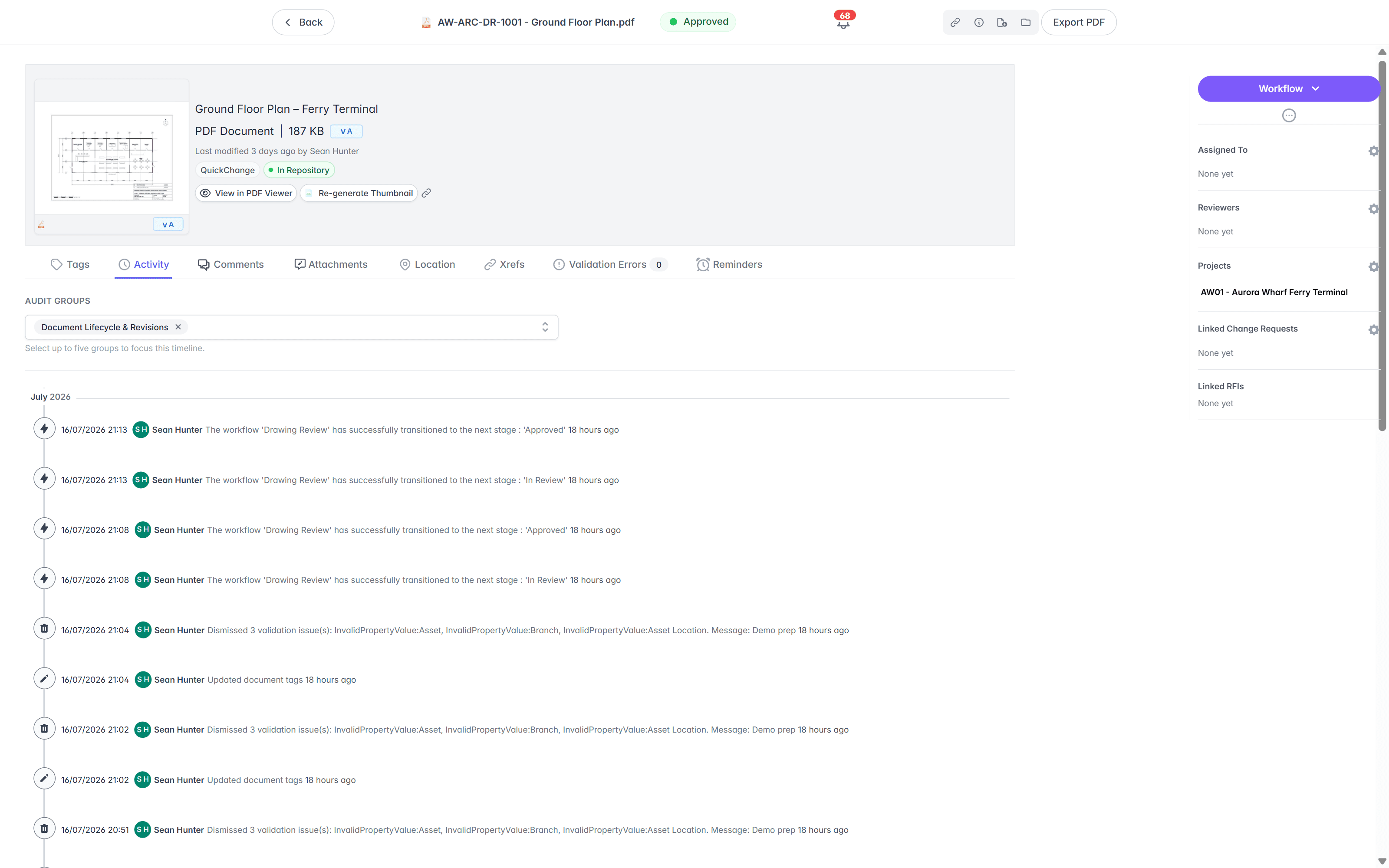
In M-Files a drawing revision is a property you define, a workflow state you model, and a view you build, all before the first sheet is booked in, and the version number itself counts every edit to the object. Lunr ships the conventions. Book a drawing in and Lunr numbers it in your register format, keeps the full revision history, and marks the previous revision as superseded.
- A controlled register per set, showing the current revision and status of every sheet.
- Automatic document and version numbering, applied in your register format as drawings are booked in.
- Superseded revisions kept and marked, never deleted and never mistaken for the current sheet.
- Title-block tags read into metadata on import, so drawing number, revision, and discipline become filters.
controlled register · automatic numbering · superseded marking · title-block metadata
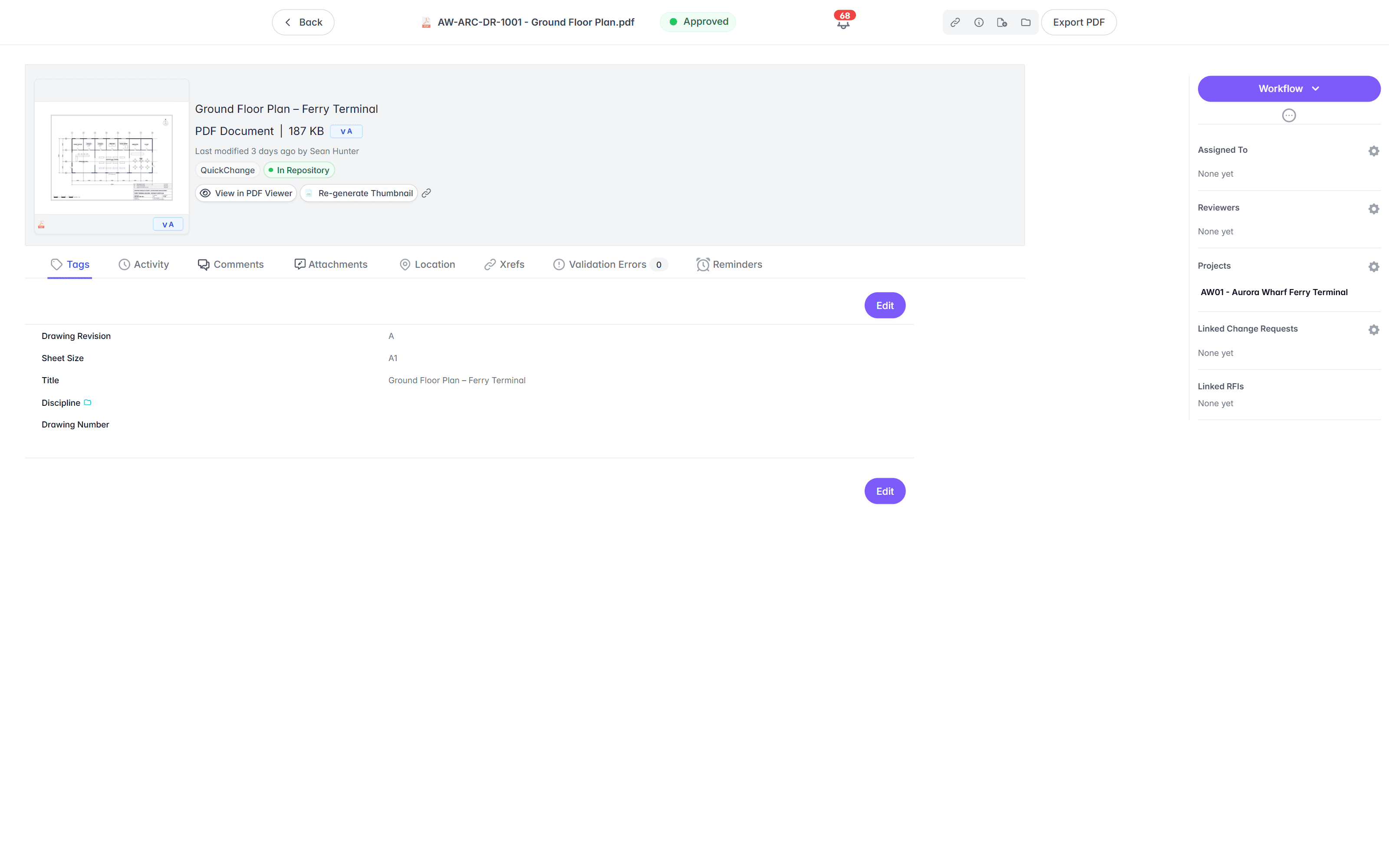
Open a DWG, DGN, or RVT in a browser tab.
M-Files documents its preview formats as email, HTML, images, Office and OpenDocument files, PDF, RTF, text, and Visio drawings. Reaching a DWG means a third-party application set as the default for that file type, in M-Files Desktop rather than M-Files Web. In Lunr the Rift viewer renders DWG, DGN, and PDF at full fidelity, with layers, measurement, and markup. Models open in Foundry, point clouds in Nimbus.
- View DWG, DGN, RVT, and PDF in the browser, with no CAD licence and nothing to install.
- Toggle layers, measure to the drawing's own scale, and mark up with a revision cloud.
- Work on macOS, Windows, a tablet, or a phone, without a supported-client list to police.
- Turn a redline into a change request or an RFI without leaving the viewer.
browser viewers · layers · measurement · markup · no CAD licence
Try the viewers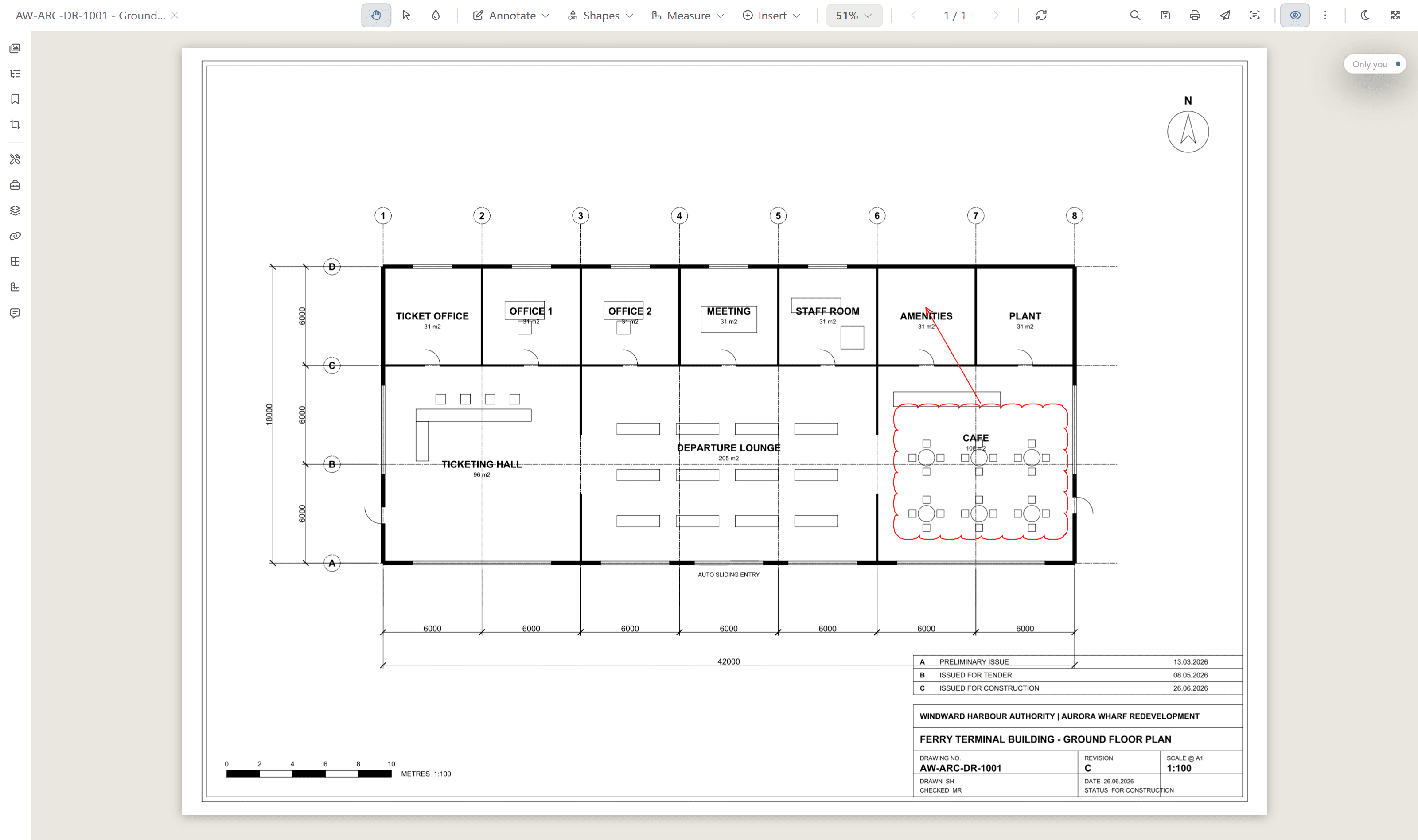
Read the whole scanned archive, not a few files at a time.
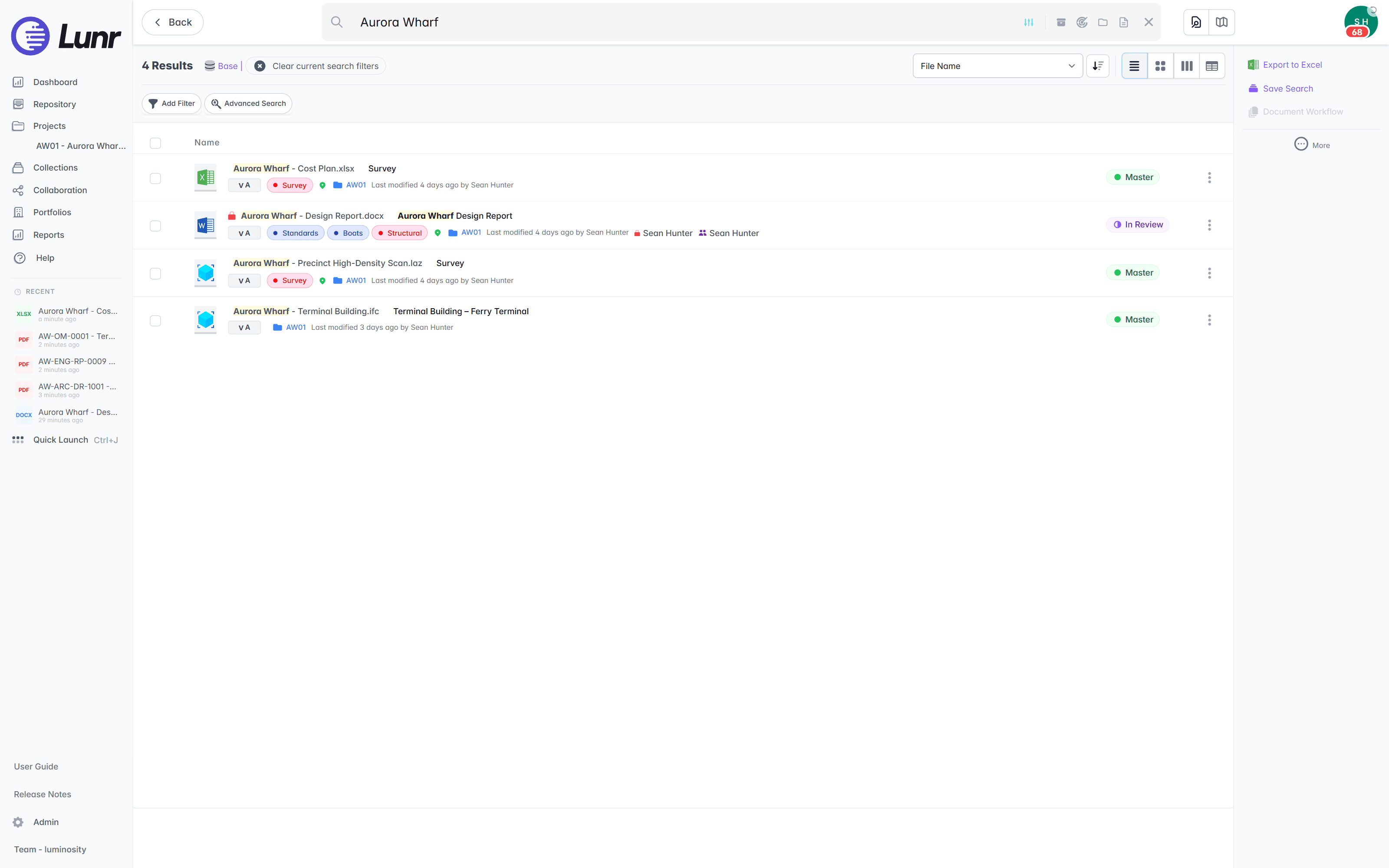
M-Files runs OCR over images and PDFs and stores the recognised text invisibly so search reaches it, and its user guide states that the OCR features do not support mass operations and are meant for a small number of files at a time. An owner inherits decades of sheets. XRAY runs OCR and AI full-text search across everything you store, and Deep XRAY re-reads a dense drawing in high-resolution tiles so crowded or faint text still resolves.
- OCR and AI full-text search across every DWG, DGN, RVT, PDF, and scanned image.
- Find a tag, a reference, or a note printed inside the drawing, not just the file name.
- Deep XRAY re-scans a dense sheet tile by tile, so nothing on the drawing is missed.
- Filter by tag and metadata, or find geo-tagged drawings on a map with polygon search.
OCR · AI full-text search · deep XRAY tile re-scan · tag and map filters
Issue a set, then check what came back against the manifest.
M-Files gives you a graphical workflow engine and an audit log, so a transmittal is a process your team designs, tests, and maintains. Lunr issues transmittals that track themselves, validates each handover package against a manifest so a missing as-constructed drawing is caught on upload, and keeps a full audit trail behind every approval, revision, and change.
- Issue tracked transmittals, and run change requests that hold, forward, and close.
- Validate each handover package against a manifest, and read title-block tags into metadata.
- Move drawings through configurable review and approval workflows your document controllers set.
- Keep a full audit trail on every controlled drawing, ready for compliance.
transmittals · manifest validation · change requests · configurable workflows · full audit trail
Move the drawings, keep M-Files for the business.
Nothing has to be ripped out. Import the drawings, map your property definitions to Lunr tags, and leave contracts, policies, and quality records where they are. The drawing record moves, and the business documents stay put.
- 01Import in bulk
Point Lunr at your M-Files export, and it reads the title-block tags from each sheet into metadata, so drawing number, revision, and discipline become fields you filter on without retyping.
- 02Map properties to tags
Each M-Files property definition is matched to a Lunr tag, so the vault structure your team built is carried across rather than thrown away. Unmatched properties are surfaced for you to resolve, and the mapping is saved and re-runnable.
- 03Keep M-Files for the business
Run M-Files for contracts, policies, quality records, and correspondence, and Lunr for the drawing record, side by side. Nothing forces an all-or-nothing move.
- 04Stand it up in weeks
Lunr arrives with drawing numbers, revisions, registers, and transmittals already modelled, so the record works in weeks rather than waiting on a vault configuration to be designed, tested, and signed off.
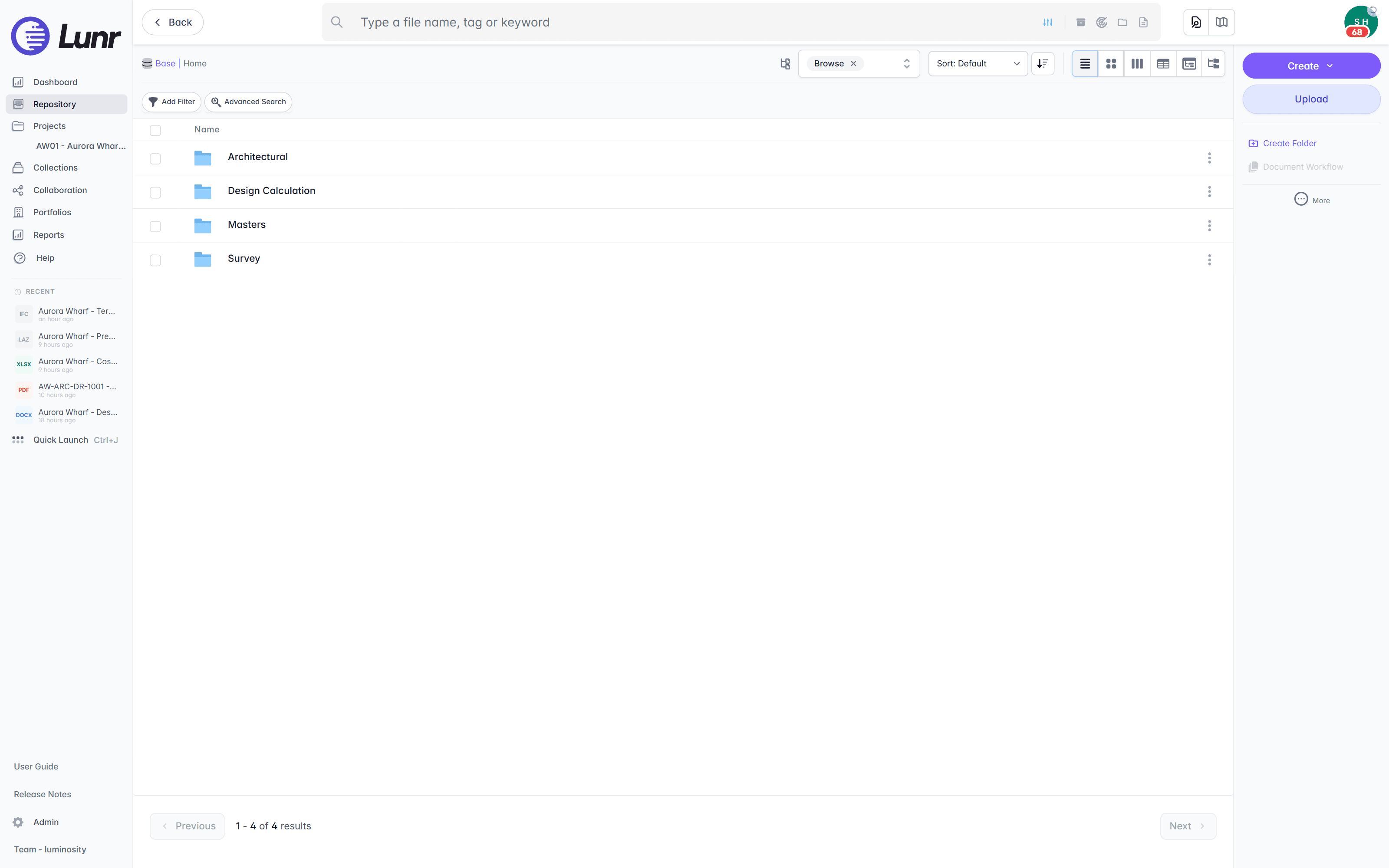
Export all metadata, drawings, and models at any time, so the record is never locked to us. See the CAD, GIS, and facilities connectors that bring drawings and models in on the connectors page.
Asset owners run the drawing record on Lunr.
Universities, utilities, energy companies, and government departments run their drawing record on Lunr, from project delivery through the operating life of the asset, on their own team.
documents under management on Lunr. Proof the drawing record holds up at owner-and-portfolio scale.
“Lunr is a simple solution that provides the flexibility to develop the system to our needs. Lunr is simple to use, and minimal training is required.”
Questions owners ask about Lunr and M-Files.
What a metadata-driven document platform gives an asset owner, what a drawing set needs on top, and how the two systems sit side by side.
- Is Lunr an M-Files alternative for engineering drawings?
- For an asset owner, yes. M-Files is a metadata-driven document management system for the whole business, organising content by what it is rather than where it is stored, and Gartner named it a Leader in the 2026 Magic Quadrant for Document Management. Engineering drawing control in M-Files is a vault your team designs: object types, classes, property definitions, and workflows modelled in M-Files Admin before the first sheet is booked in. Its purpose-built industry applications launched in April 2026 point at tax advisory, quality, and contracts. Lunr holds the drawing record as its own job, with drawing numbers, revisions, registers, transmittals, CAD viewing, and OCR across scanned sheets working on day one.
- Can M-Files manage CAD drawings and open them in the browser?
- It manages the files, and its AutoCAD integration is genuine: open, save, check out, check in, undo checkout, and insert M-Files metadata fields into a drawing, all without leaving AutoCAD. Browser viewing is the gap. M-Files documents its preview formats as email, HTML, images, Office and OpenDocument files, PDF, RTF, text, and Visio, and extending preview to a DWG needs a third-party application set as the default for that file type, which M-Files has confirmed works in M-Files Desktop rather than M-Files Web. Syncing metadata into AutoCAD title-block attributes is a separately purchased partner app. In Lunr, anyone you grant access opens DWG, DGN, RVT, and PDF in the Rift viewer with layers, measurement, and markup, with no CAD licence and nothing installed.
- Can M-Files search the text inside a scanned drawing?
- M-Files does run OCR, over TIF, TIFF, JPG, JPEG, BMP, PNG, and PDF, and it stores the recognised text invisibly in a searchable PDF so full-text search reaches the content. The limit an owner runs into is scale: the user guide states that the OCR features do not support mass operations and are meant for conversions of a small number of files at a time, and DWG is not among the supported types. Lunr runs XRAY across everything you store, so a valve tag on a 1994 scan turns up as fast as a file saved this morning, and Deep XRAY re-reads a dense sheet in high-resolution tiles so crowded or faint text still resolves.
- Can you keep M-Files alongside Lunr?
- Yes, and for most owners it is the sensible setup. Keep M-Files for contracts, policies, quality records, and the correspondence the rest of the business runs on, and put the drawing record on Lunr. You gain a controlled register, browser CAD viewing, transmittals, and searchable scanned archives without a platform migration, and each system keeps doing what it is good at. Every Lunr capability is standard for everyone you grant access, so there is no tier to administer between a document controller and a facilities officer. Pricing is shaped to your organisation, so send an RFQ or an RFP and we will scope it with your team.
Keep M-Files for the business. Give the drawings a home.
Book a walkthrough with someone who knows what a transmittal and an as-constructed drawing are, and watch Lunr run against a set of your own.
10M+ documents under management · Hosted in Australia and the US · SAML · Full audit trail · Export anytime
- entity
- Lunr Labs Pty Ltd
- location
- Melbourne AU
- workspace
- documents.lunr.app
- rev
- 2026