A Synergis Adept alternative that needs no server room.
For the owners and document controllers who hold the record once the drawing is issued. Put every DWG, DGN, and RVT under revision control, search the text printed inside scanned sheets, and open any drawing in the browser, with no Windows Server, no SQL Server, and no licence tier deciding what your team may do.
10M+ documents under management · Hosted in Australia and the US · SAML · Full audit trail
Adept is capable software, for the job it was built for.
Adept puts a task pane inside AutoCAD, Inventor, and SOLIDWORKS, keeps file relationships across an assembly, and holds the files on hardware you own. An engineering office that authors CAD all day, on Windows, in its own data centre, is the case Adept was designed around.
The claim here is narrow. It is about the record after the drawing is issued, and about what it costs to keep that record on your own servers for the decades you operate the asset.
Read why teams move CAD drawings to a controlled cloud record- CAD authoring at the desk, with an Adept task pane inside AutoCAD, Inventor, and SOLIDWORKS.
- File relationships across an assembly, so a part, a subassembly, and its drawing stay linked.
- Files held on hardware you own, where a policy requires the data to stay in your data centre.
- Distributed vaults across dispersed sites, replicating file changes between them.
Where an owner hits the edge of an on-premise platform.
Each point below is drawn from Synergis’s own published system requirements and licence-type pages, so your IT department can check every one of them. Together they describe the estate an owner carries to keep the drawing record available.
Adept and Lunr, capability by capability.
A factual read of what each system does across the life of a drawing. Adept holds the advantage inside the CAD application. Lunr holds it once the drawing is issued and the rest of the organisation needs to read, search, and control the record.
| Capability | On Adept, on premise | On Lunr |
|---|---|---|
| CAD authoring integration at the designer's desk | Task panes inside AutoCAD, Inventor, and SOLIDWORKS | Not an authoring add-in; issued drawings arrive by connector, upload, or transmittal |
| Where the files sit | Your servers, in your data centre | Hosted in Australia or the US, in the region you require |
| Servers needed to run the record | Windows Server and IIS, with SQL Server or Oracle | None, the record runs in the browser |
| Software installed to render a file for a read-only user | Word, Excel, eDrawings Publisher, and Inventor on the web server | None, Rift renders drawings and PDFs in the browser |
| Workstation requirements to read a drawing | Windows 10 or 11, with .NET Framework 4.8 | A browser, on any operating system |
| What a person is allowed to do | Set by Explorer, Reviewer, Creator, or Desktop licence | Every capability standard, for everyone you grant access |
| Measurement and markup in the browser | Yes, in the Adept Viewer | Yes, in Rift, with Signal redlining, stamps, and signatures |
| Full-text search inside scanned drawings | OCR available for scanned documents | XRAY reads every sheet, and Deep XRAY re-scans a dense drawing tile by tile |
| Word and Excel files | Rendered server-side by installed copies of Office | Opened natively in Rift Word and Rift Excel, with no Office licence |
| 3D models and point clouds | 3D CAD models in the viewer | Models in Foundry, point clouds in Nimbus |
| Getting a new release | You plan, test, and apply each upgrade | Applied continuously, nothing for your team to schedule |
Adept rows describe the on-premise platform as published by Synergis. Adept Cloud is a separate, newer product.
Open a DWG, DGN, or RVT in a browser tab, on any machine.
With Adept, reading a drawing brings a client, a Windows workstation, and a licence type with it. In Lunr the Rift viewer renders DWG, DGN, and PDF at full fidelity, with layers, measurement, and markup, in the browser. Models open in Foundry, point clouds in Nimbus, on a laptop or from the field.
- View DWG, DGN, RVT, and PDF in the browser, with no CAD licence and nothing to install.
- Toggle layers, measure to the drawing's own scale, and mark up with a revision cloud.
- Work on macOS, Windows, a tablet, or a phone, without a supported-client list to police.
- Give operations, facilities, and contractors access without a client deployment.
browser viewers · layers · measurement · markup · no client install
Try the viewers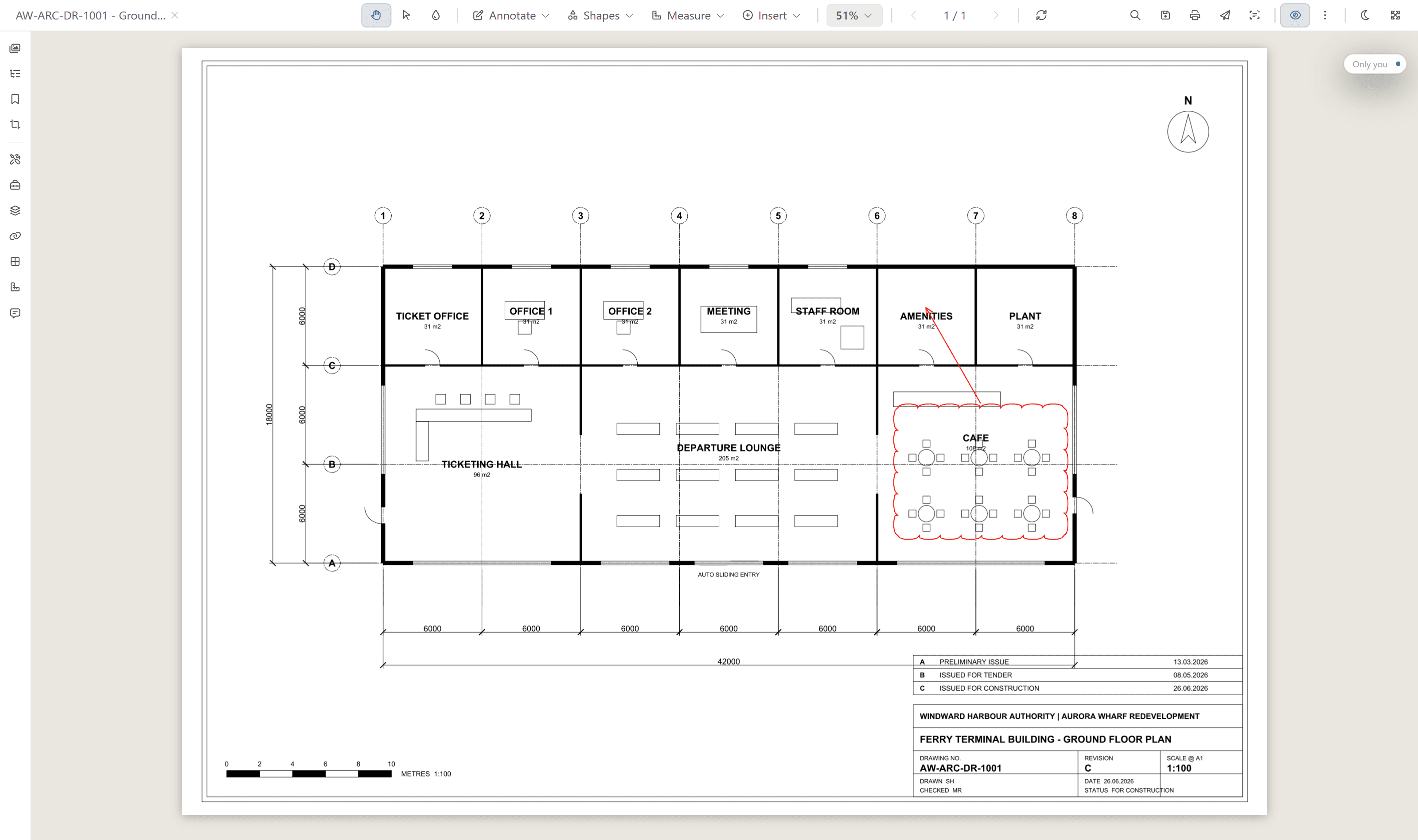
No copy of Office installed on a server to read a report.
Adept’s published requirements expect Microsoft Word, Microsoft Excel, eDrawings Publisher, and Autodesk Inventor on the Adept Web Server so that read-only users can see those files. Lunr renders them in the browser instead. Rift Word and Rift Excel open DOC, DOCX, and spreadsheets natively, with real pagination, tables, and track changes by author, and no Office licence.
- Read DOC and DOCX natively in the browser, with the ribbon and status bar you expect.
- Follow track changes by author, so a marked-up design report opens the same way whoever sent it.
- Open spreadsheets with their fonts, fills, borders, number formats, and merged cells intact.
- Keep specifications, reports, and registers in the same controlled record as the drawings.
native rendering · track changes by author · no office licence · no rendering server
See the document viewers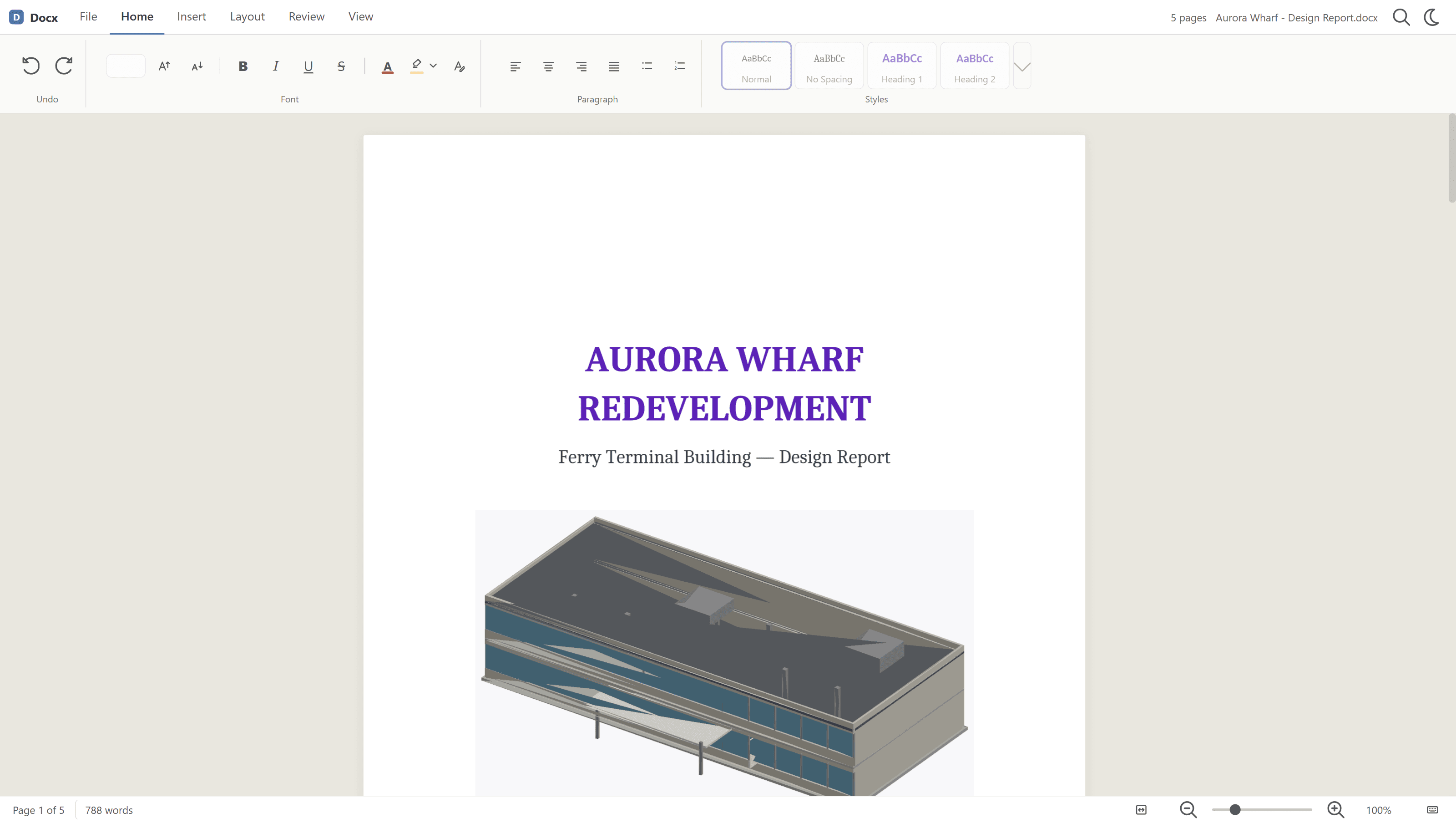
Search the words printed inside a scanned drawing.
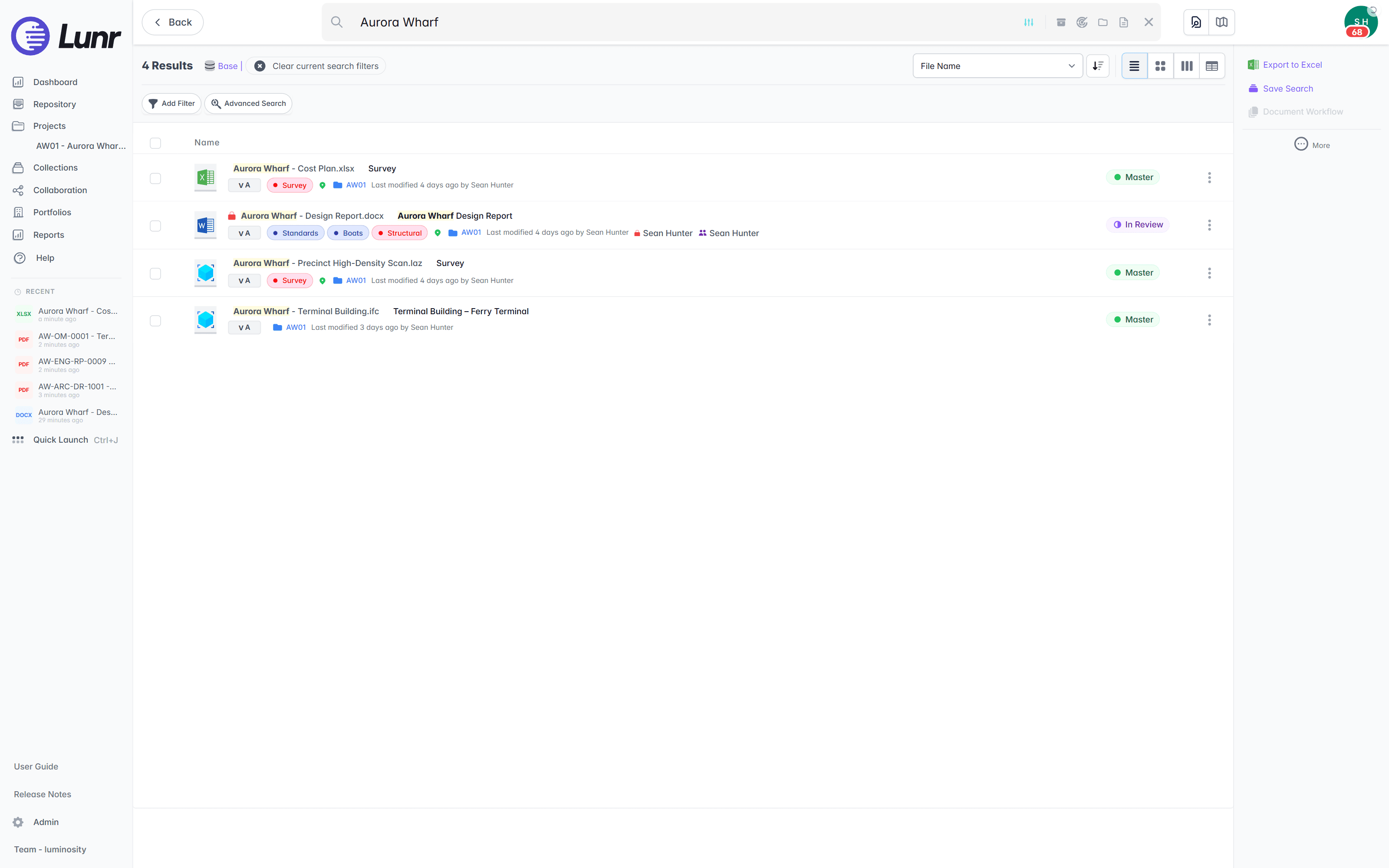
An owner inherits decades of scanned sheets. XRAY runs OCR and AI full-text search across everything you store, so a valve tag from a 1994 scan turns up as fast as a file you saved this morning. For a dense drawing, Deep XRAY re-reads the sheet in high-resolution tiles, so faint or crowded text still resolves.
- OCR and AI full-text search across every DWG, DGN, RVT, PDF, and scanned image.
- Find a tag, a reference, or a note printed inside the drawing, not just the file name.
- Deep XRAY re-scans a dense sheet tile by tile, so nothing on the drawing is missed.
- Filter by tag and metadata, or find geo-tagged drawings on a map with polygon search.
OCR · AI full-text search · deep XRAY tile re-scan · tag and map filters
A register your own team configures.
Book a drawing in and Lunr numbers it, keeps its full revision history, and marks the previous revision as superseded. Title-block fields come across as searchable metadata, workflows and tags are set up by your document controllers, and every controlled document carries an audit trail behind it.
- A controlled register per set, showing the current revision and status of every sheet.
- Automatic document and version numbering, applied in your register format as drawings are booked in.
- Configurable review and approval workflows, with tag-based permissions your team sets.
- Transmittals in and out, validated against a manifest so a missing as-constructed is caught on delivery.
controlled register · automatic numbering · configurable workflows · manifest validation
See document control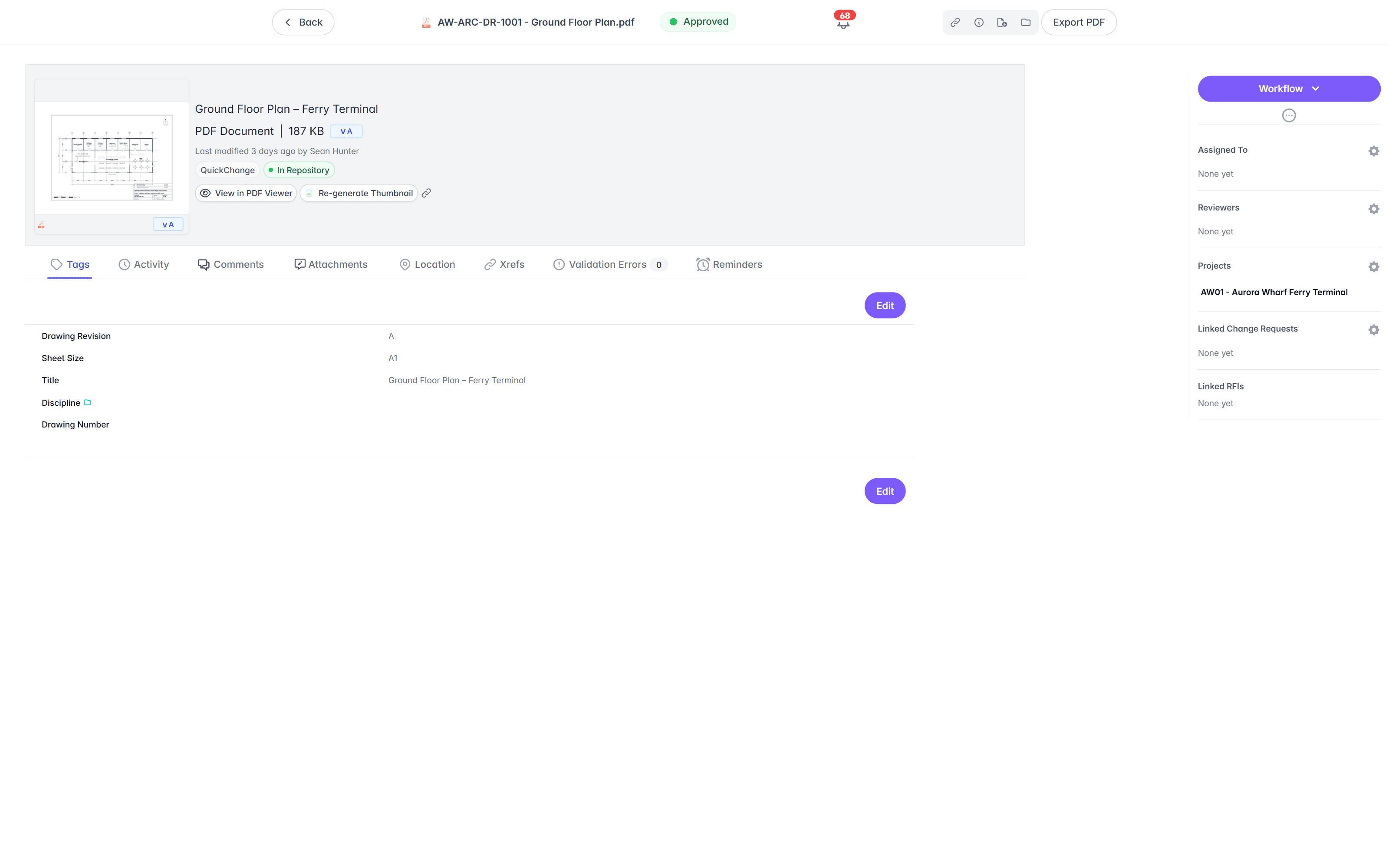
Move the record first, retire the servers after.
Nothing is ripped out on day one. Take the inventory, map the fields, load and reconcile in batches, then cut over on your date. Adept keeps running until the record is proven in Lunr, and your Windows and SQL estate retires once it is.
- 01Take the inventory
Read the Adept database and vaults, and count what is there: documents, versions, renditions, and the fields in use. Nothing moves before the inventory is agreed.
- 02Map fields to tags
Each Adept field is matched to a Lunr tag, so drawing number, revision, and discipline stay searchable metadata. Unmatched columns are surfaced for you to resolve, and the mapping is saved and re-runnable.
- 03Load and reconcile
Documents come across in batches with their PDF renditions, then every record is reconciled against the inventory. Anything without a file or a tag is reported rather than dropped.
- 04Cut over, then switch off the servers
Lunr becomes the controlled record on a date that suits your team. Adept keeps running until then, and the Windows and SQL estate retires after cut over instead of before it.
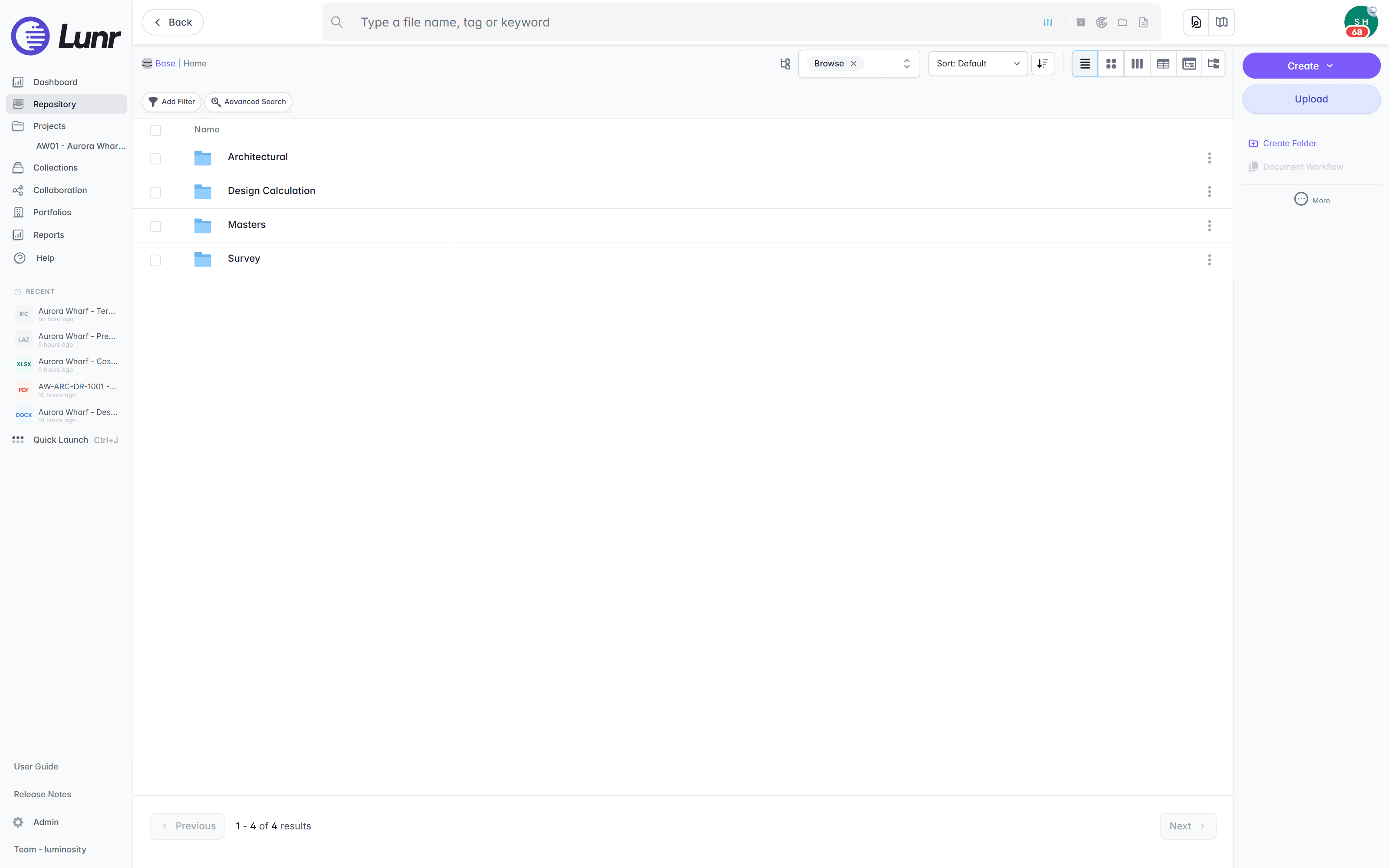
Export all metadata, drawings, and models at any time, so the record is never locked to us. See the CAD, GIS, and facilities connectors that bring drawings and models in on the connectors page.
Owners already run their record on Lunr.
Universities, utilities, energy companies, and government departments run their drawing record on Lunr, from project delivery through the operating life of the asset, on their own team.
documents under management on Lunr. Proof the drawing record holds up at owner-and-portfolio scale.
“Lunr is a simple solution that provides the flexibility to develop the system to our needs. Lunr is simple to use, and minimal training is required.”
Questions owners ask about Lunr and Synergis Adept.
What Adept is built for, what an owner carries to keep it running, and what it takes to move the record into the browser without interrupting the design office.
- Is Lunr a Synergis Adept alternative?
- For an asset owner, yes. Adept is engineering document management designed to run on your own servers, with capability sorted into Explorer, Reviewer, Creator, and Desktop licences and integrations that live inside the CAD applications. Lunr is the owner's controlled record, held in the browser, with revision control, transmittals, and search inside scanned sheets, and no Windows Server, IIS, or SQL Server for your team to run. Owners choose Lunr when they want the record available to everyone who needs it without deploying a client or buying a licence tier first.
- What is the difference between Lunr and Adept?
- The difference is where the record lives and who keeps it running. Adept is an on-premise platform: a Native Server, a Web Server, a database on SQL Server or Oracle, and a file system server, patched and upgraded by your team, with a Windows client on each workstation. Lunr is hosted in Australia or the US and reached through a browser, so drawings, models, and Office files open on any operating system with nothing installed. Adept holds the advantage inside the CAD application at the designer's desk. Lunr holds the advantage everywhere else in the organisation.
- Do we still need Windows Server, SQL Server, and an Adept Web Server?
- No. Lunr runs as a hosted service, so there is no application server, no database instance, and no web server of yours in the path between a person and a drawing. There is also no GPU to specify for viewer rendering and no copy of Word, Excel, eDrawings Publisher, or Inventor installed on a server to render files for read-only users. Rift renders drawings and PDFs in the browser, and Rift Word and Rift Excel open Office documents natively.
- What happens to our AutoCAD, Inventor, and SOLIDWORKS integration?
- Lunr is not an authoring add-in, and that is a real difference to weigh. Designers carry on authoring in AutoCAD, Inventor, or SOLIDWORKS, and the issued drawings reach the record through the CAD APIs, bulk import, or a transmittal from the consultant. What the whole organisation gains is a record anyone can read: DWG, DGN, RVT, PDF, and Office files open in the browser with no CAD licence, and no client install on the workstation.
- Do people need a particular licence type to view or mark up a drawing?
- No. Every capability is standard: the viewer, revision control, project spaces, XRAY search, sovereign hosting, single sign-on, and the full audit trail. There is no Explorer, Reviewer, Creator, or Desktop distinction to administer, so a facilities officer who needs to measure a sheet and a document controller who runs the register work in the same system without a licence change. Pricing is shaped to your organisation, so send an RFQ or an RFP and we will scope it with your team.
- How does moving off Adept work, and what comes across?
- Revisions, renditions, dates, and metadata come across as controlled records. Adept revision numbers land as controlled metadata, so REV C stays REV C, and the native drawing and its PDF rendition stay together as one record. Each Adept field is mapped to a Lunr tag, unmatched columns are flagged for you to resolve, and every batch is reconciled against the inventory before it is booked in. Adept keeps running until cut over, so the record moves before the servers retire.
- We are already looking at Adept Cloud. Why run a tender?
- Because either path is a migration, and the terms are worth comparing while you have the choice. Adept Cloud is a genuine option from a vendor you know. Lunr asks to be judged on what the record does for an owner: browser access on any operating system with no licence tier deciding what a person may do, OCR and AI search across scanned archives, sovereign hosting in Australia or the US, a system your own team configures, and export of all metadata, drawings, and models at any time. Send the same RFQ to both and read the answers side by side.
Keep the CAD desk. Move the record to the browser.
Book a walkthrough with someone who knows what a transmittal and an as-constructed drawing are, and watch Lunr run against a set of your own.
10M+ documents under management · Hosted in Australia and the US · SAML · Full audit trail · Export anytime
- entity
- Lunr Labs Pty Ltd
- location
- Melbourne AU
- workspace
- documents.lunr.app
- rev
- 2026