A TeamBinder alternative built for the asset owner.
For the owners and document controllers who hold the record after the project team stands down. TeamBinder, now InEight Document, runs project delivery well. Lunr takes the controlled set at close-out and keeps it live for the operating life of the asset, with a register you own, browser viewing, and search inside every scanned sheet.
10M+ documents under management · Hosted in Australia and the US · SAML · Full audit trail
TeamBinder is strong software, for the job it was built for.
QA Software was founded in Melbourne in 1995, and Australian delivery teams have run infrastructure, mining, and energy projects on TeamBinder for decades. InEight, a Kiewit company, acquired QA Software in 2018 and rebranded the product as InEight Document. It is a capable delivery platform with real Australian credentials, and it completed an IRAP assessment at the PROTECTED level in January 2026.
The claim here is narrow. It is about what the owner is left holding once the project archive is cut, and about the record that has to keep taking revisions for the next thirty years.
Read how as-constructed drawings reach the owner- Project delivery, where a principal, contractors, and consultants work to one controlled register.
- Mail and formal correspondence, with instructions, letters, and meeting minutes numbered on the record.
- Transmittals that issue documents to external parties, and record when each one was downloaded.
- Review and approval workflows that run in serial, parallel, or hybrid order through the delivery team.
Where a delivery platform hits the edge of the owner’s record.
Each point below is drawn from InEight’s own product pages and Learn documentation, so your document control team can check every one of them. Together they describe what changes for the owner on the day the project closes.
TeamBinder and Lunr, capability by capability.
A factual read of what each tool does across the asset lifecycle. The two are not rivals for every row. InEight Document runs project delivery, and Lunr holds the record the owner keeps after close-out.
| Capability | On TeamBinder, now InEight Document | On Lunr |
|---|---|---|
| Coordinate document exchange across project parties in delivery | Yes, its core strength | Not its role; Lunr is the owner's record |
| Mail, instructions, and formal project correspondence | Yes, numbered on the delivery record, with Outlook integration | Stays in delivery, referenced from the record |
| Transmittals issuing a document set | Yes, to external parties, with download tracking | Yes, from the owner's register, validated against a manifest |
| What the record is scoped to | One project at a time | The whole asset, across every project and decade |
| A live controlled register held after the project closes | A project archive, requested and delivered as files | Yes, a live register the owner runs |
| Revisions and as-constructed drawings land through operation | Built for delivery, not the operating phase | Yes, the register stays live for the asset's life |
| Markup on the native drawing | PDF, with more limited functionality on DWG | DWG, DGN, and PDF in Rift, with layers, measurement, and markup |
| Full-text search inside scanned sheets | OCR on scanned PDFs, English only, where the setting is on | XRAY reads drawings, PDFs, and scans, and Deep XRAY re-scans tile by tile |
| 3D models and point clouds | 3D CAD formats in the online viewer | Models in Foundry, point clouds in Nimbus |
| Where the record is hosted | InEight's cloud, or self-hosted by the company | Australia or the US, in the region you require |
| Owned system of record for decades of operation | Project record, archived at close-out | The owner's system of record, held as their own |
TeamBinder rows describe InEight Document as published by InEight, including its enhanced interface documentation.
A live register the owner holds, not a project archive on a disk.
Take the controlled set at close-out and Lunr numbers it in your register format, keeps the full revision history, and marks the previous revision as superseded. Title-block fields come across as searchable metadata, so drawing number, revision, and discipline are things you filter on. Then the register stays live, and every revision through operation lands straight against it.
- A controlled register the owner holds, showing the current revision and status of every sheet at a glance.
- Automatic document and version numbering, applied in your register format as drawings are taken on.
- Superseded revisions kept and marked, so the current sheet is never a guess years into operation.
- One register across every project and every decade, rather than a separate record per project.
owner’s register · automatic numbering · superseded marking · title-block metadata
See document control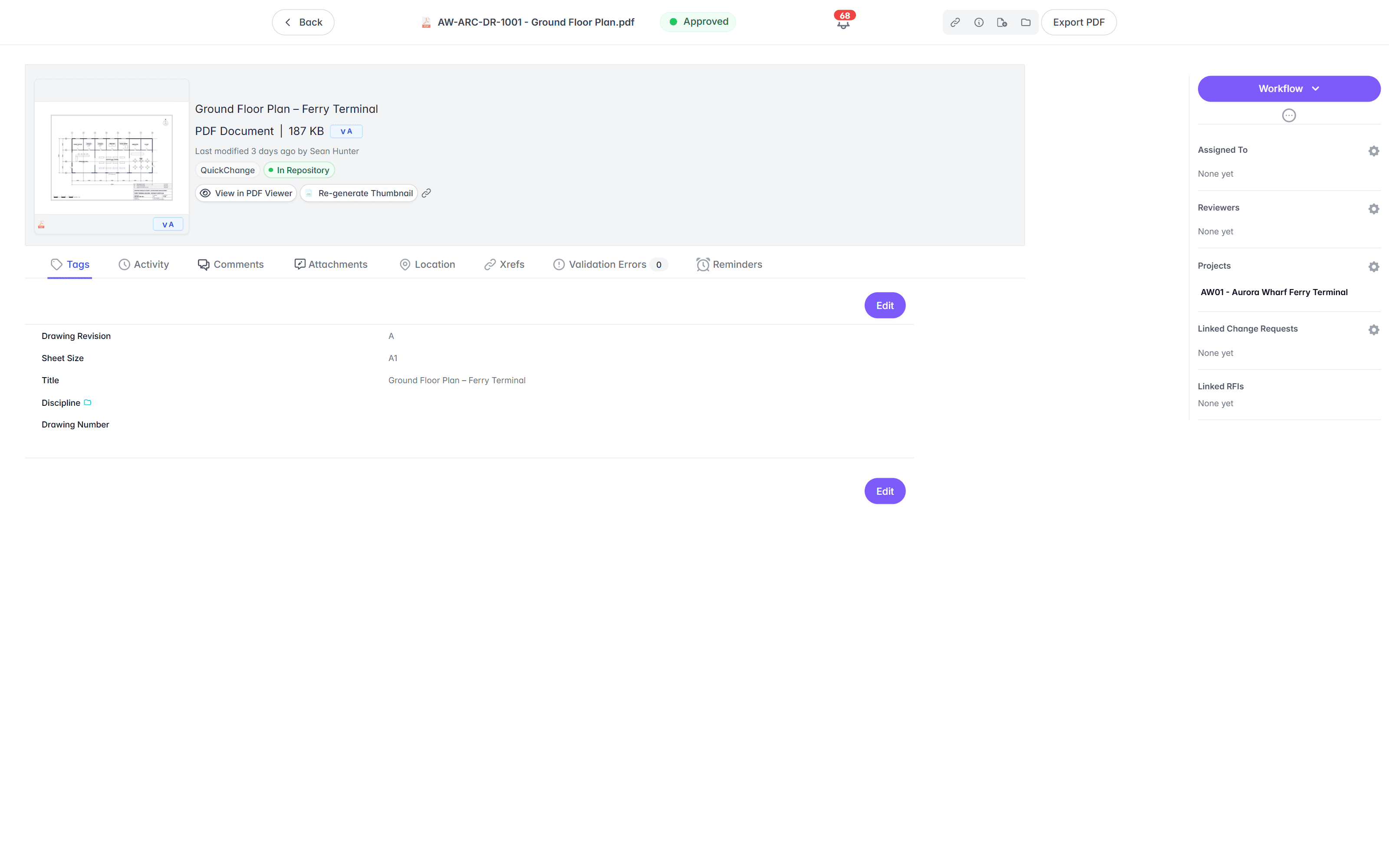
Open the native DWG, DGN, or RVT in a browser tab.
InEight’s published FAQs put markup on PDF files, with more limited functionality on DWG, and route PDF review into a Bluebeam Studio Session wherever that integration is used, which needs Bluebeam accounts on a Core or Complete licence. In Lunr the Rift viewer renders DWG, DGN, and PDF at full fidelity, with layers, measurement, and markup, so anyone maintaining the asset can open the sheet. Models open in Foundry, point clouds in Nimbus.
- View DWG, DGN, RVT, and PDF in the browser, with no CAD licence and nothing to install.
- Toggle layers, measure to the drawing's own scale, and mark up with a revision cloud.
- Open BIM models in Foundry and point clouds in Nimbus from the same record.
- Turn a redline into a change request or an RFI without leaving the viewer.
browser viewers · layers · measurement · markup · no CAD licence
Try the viewers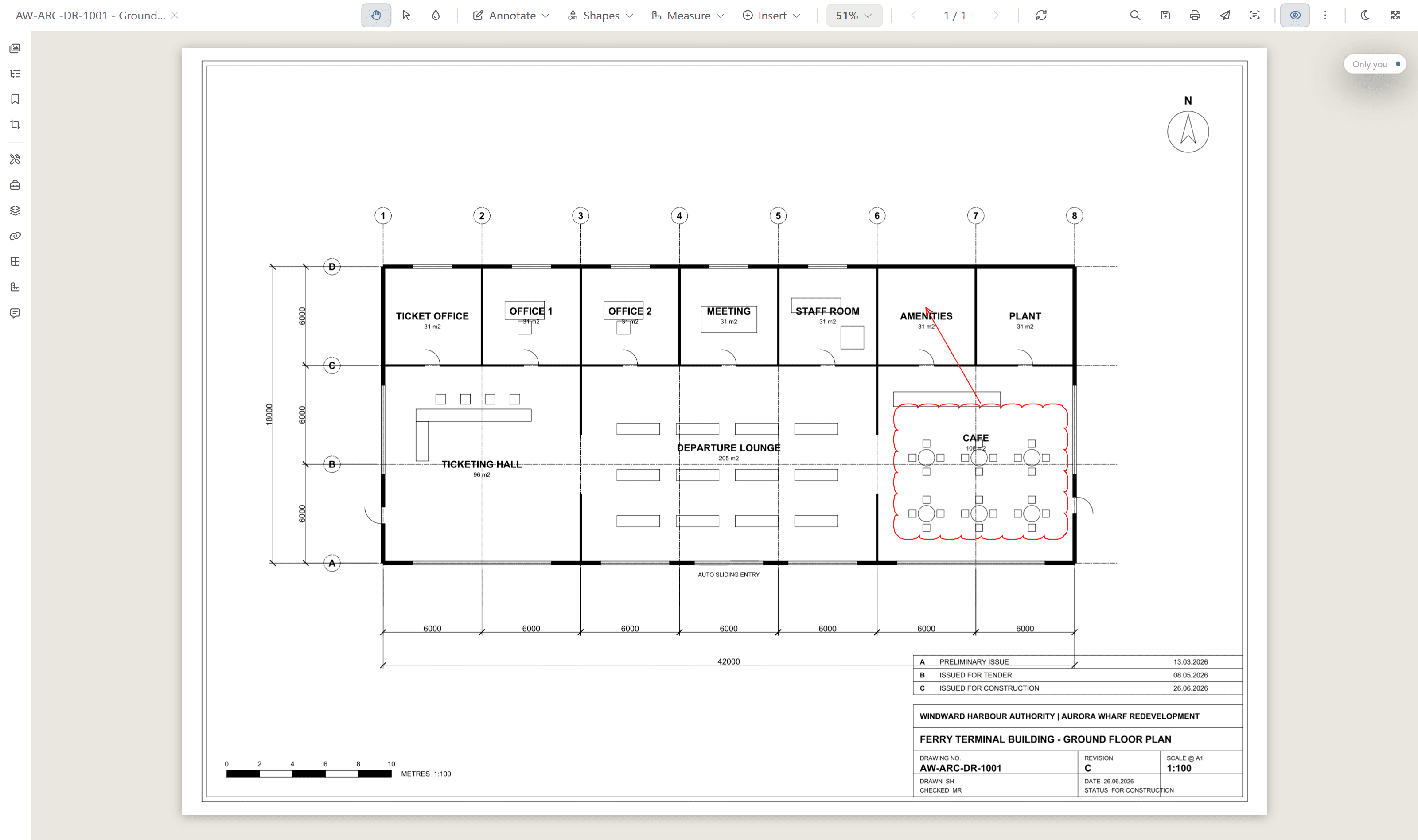
Search the words printed inside a scanned drawing.
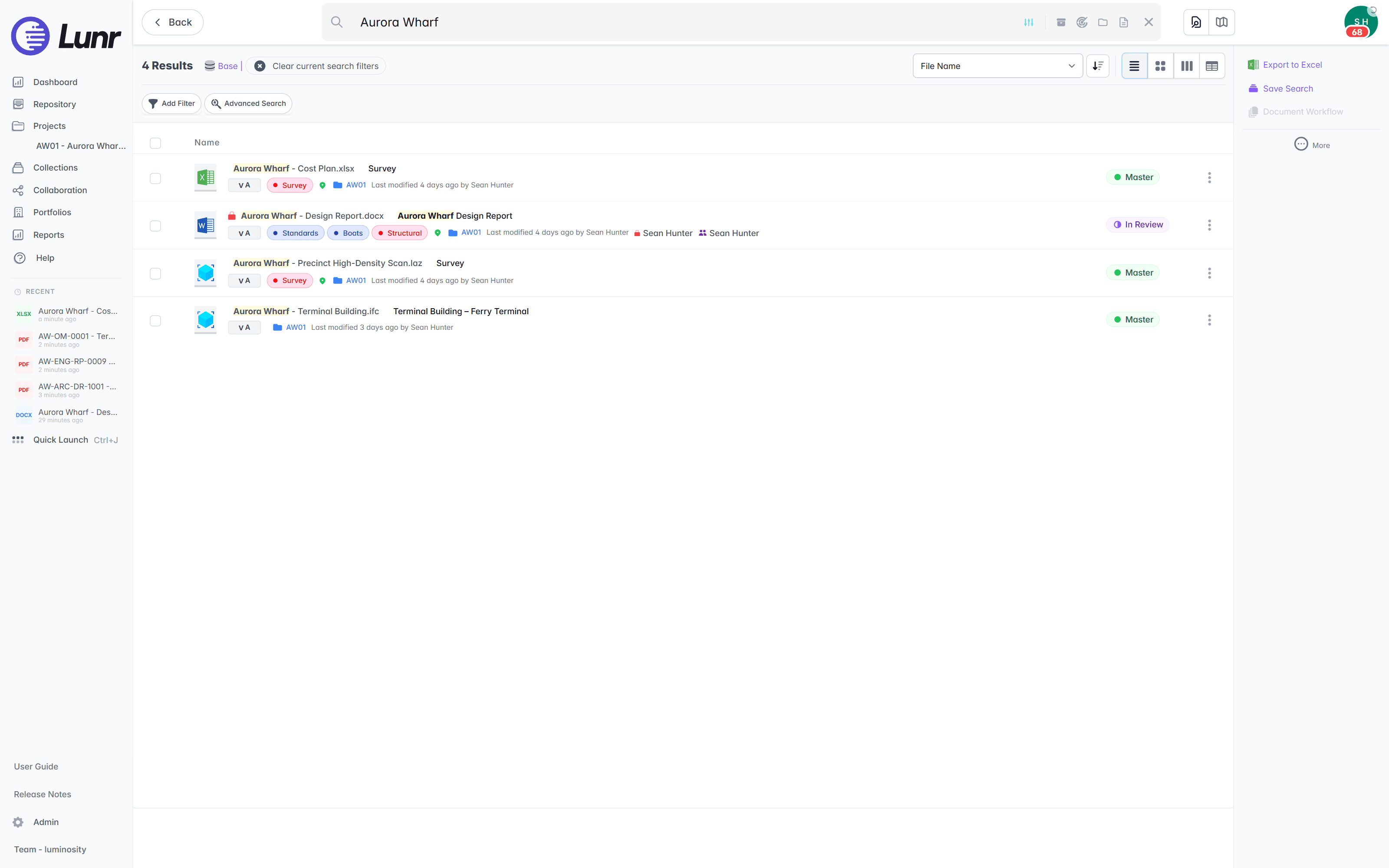
InEight Document runs OCR over scanned PDFs, in English, on projects where the setting is turned on. An owner’s archive is wider than that. XRAY runs OCR and AI full-text search across every DWG, DGN, RVT, PDF, and scanned image you hold, so a valve tag on a 1994 sheet turns up as fast as a file saved this morning, and Deep XRAY re-reads a dense drawing in high-resolution tiles.
- OCR and AI full-text search across every DWG, DGN, RVT, PDF, and scanned image.
- Find a tag, a reference, or a note printed inside the drawing, not just the file name.
- Deep XRAY re-scans a dense sheet tile by tile, so nothing on the drawing is missed.
- Filter by tag and metadata, or find geo-tagged drawings on a map with polygon search.
OCR · AI full-text search · deep XRAY tile re-scan · tag and map filters
Take close-out on the record, with an audit trail behind it.
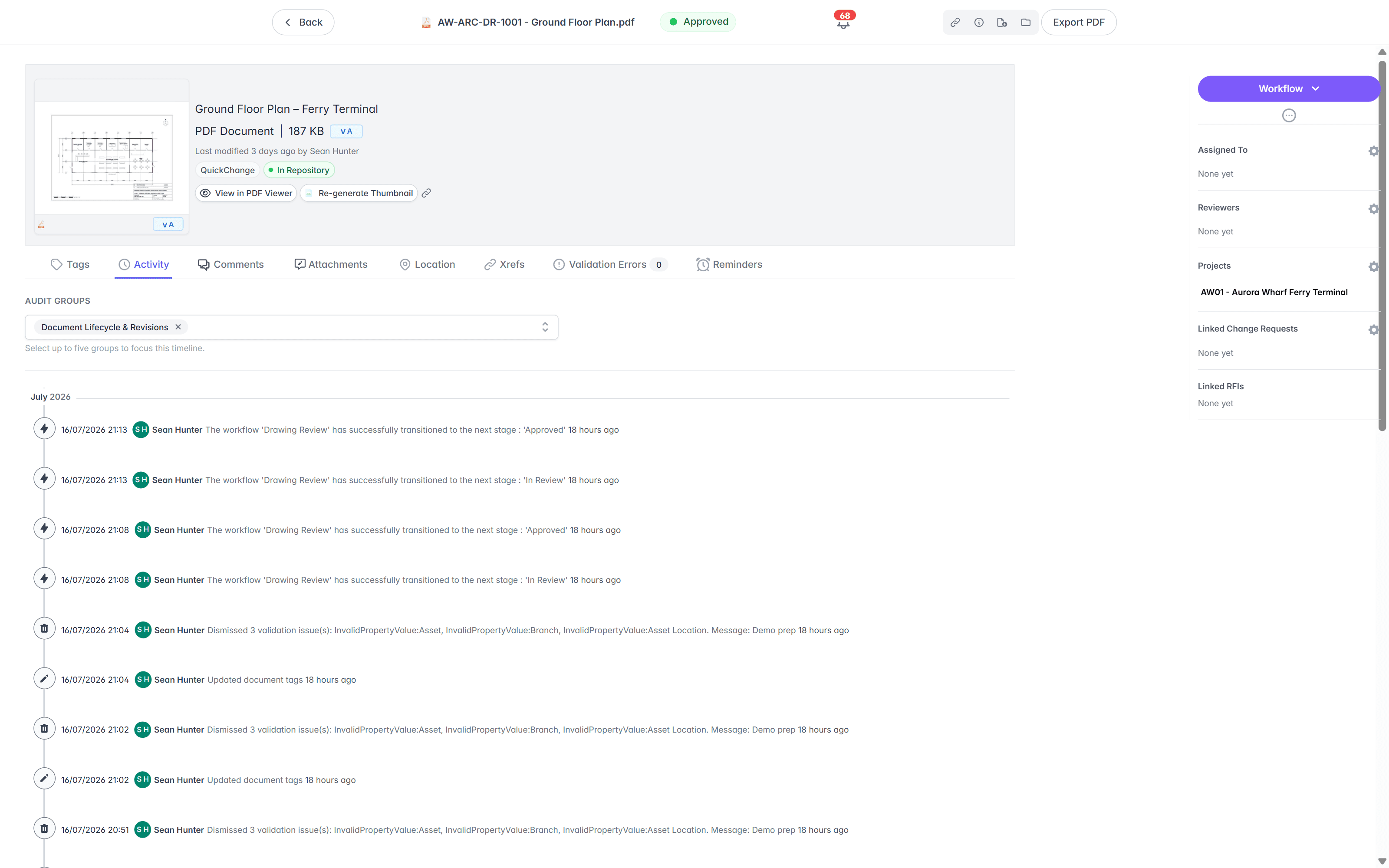
Lunr validates each close-out package against a manifest, so a missing as-constructed drawing is caught on upload rather than found years into operation. It issues transmittals from the owner’s register, moves operational revisions through configurable review and approval, and keeps a full audit trail behind every approval, revision, and change.
- Validate each close-out package against a manifest, and read title-block tags into metadata.
- Issue tracked transmittals from the owner's register, and run change requests that hold, forward, and close.
- Move operational revisions through configurable review and approval workflows your team sets.
- Keep a full audit trail on every controlled drawing, ready for compliance and audit.
manifest validation · transmittals · change requests · configurable workflows · full audit trail
Take the record at close-out, keep InEight Document for delivery.
You do not have to settle for an exported archive or rebuild the register by hand. Import the close-out set, validate it against the manifest, bring the legacy archive alongside, and open the register for operations. The owner’s record moves to Lunr, and the delivery team carries on running the next project where it always has.
- 01Take the close-out set in bulk
Point Lunr at the deliverables issued out of InEight Document, and it reads the title-block tags from each sheet into metadata, so drawing number, revision, and discipline become fields the owner can filter on.
- 02Validate against the manifest
Each package is checked against a manifest as it lands, so a missing as-constructed drawing is caught on upload rather than found years into operation.
- 03Bring the legacy archive alongside
Load the decades of older sheets no project ever touched, scans included, and run XRAY across the lot, so a 1994 drawing and this year's as-constructed sit in one register.
- 04Open the register for operations
The controlled set becomes a live register the owner runs, where new revisions land through the operating life of the asset, and the next project hands its close-out set to the same place.
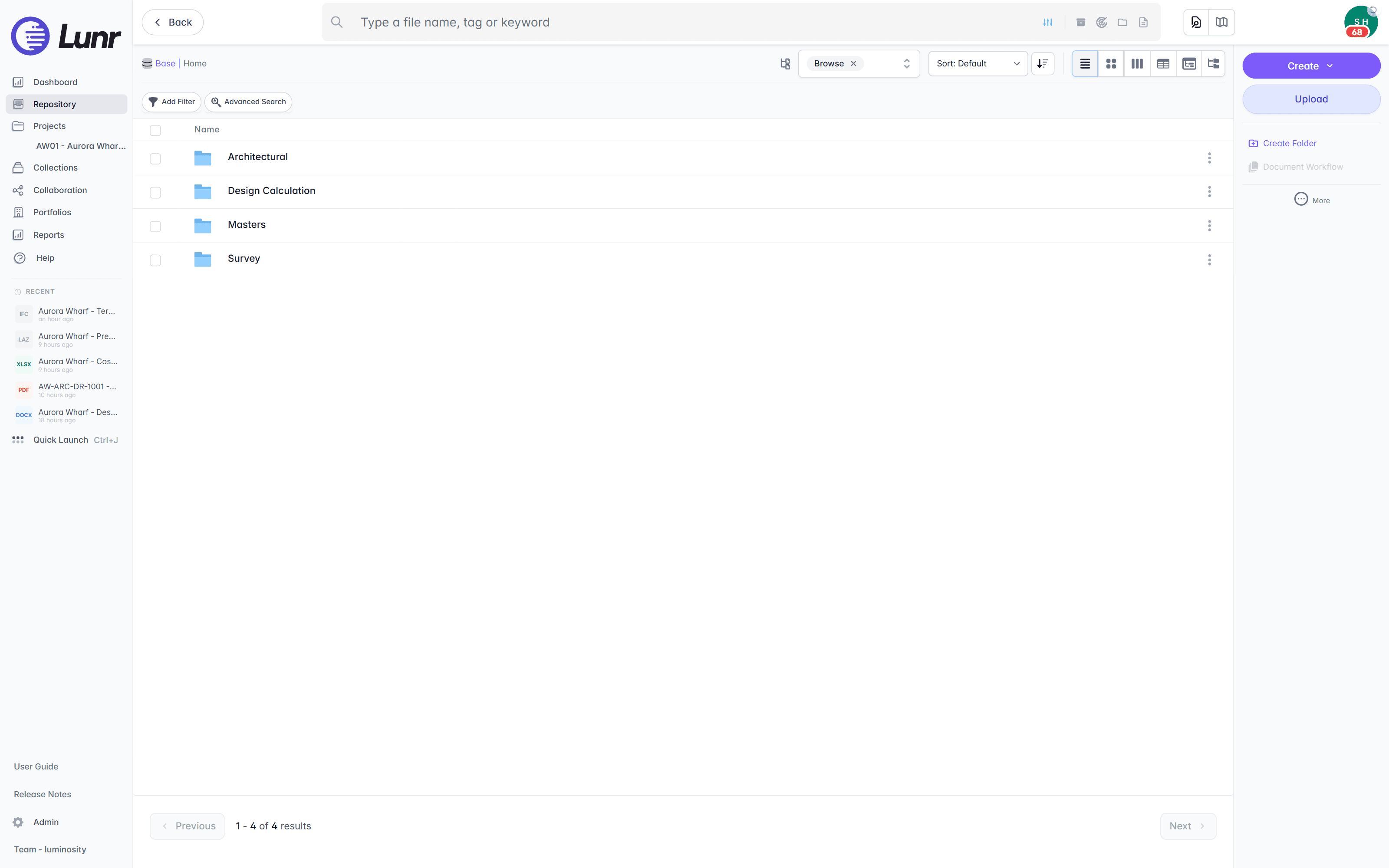
Export all metadata, drawings, and models at any time, so the record is never locked to us. See the CAD, GIS, and facilities connectors that keep the owner’s record fed on the connectors page.
Australian owners already run the record this way.
Universities, utilities, energy companies, and government departments run their drawing record on Lunr, taking it at close-out and keeping it live through the operating life of the asset.
documents under management on Lunr. Proof the owner’s record holds up at owner-and-portfolio scale.
“Lunr is a simple solution that provides the flexibility to develop the system to our needs. Lunr is simple to use, and minimal training is required.”
Questions owners ask about TeamBinder and the record after close-out.
What the product is called now, what InEight Document does through delivery, what changes when the project closes, and what it takes to keep the record live for the operating life of the asset.
- Is Lunr a TeamBinder alternative?
- For an asset owner, yes. TeamBinder, now InEight Document, is a project collaboration and document control platform, and it coordinates the mail, transmittals, packages, and review workflows across every party through design and construction. Lunr is the owner's system of record from close-out onward. The two are not rivals during delivery. The alternative Lunr offers is to the practice of letting the record end as a project archive, when the owner needs a controlled register they hold for decades of operation.
- TeamBinder or InEight Document, which is the current name?
- Both name the same product. TeamBinder was built by QA Software in Melbourne, InEight acquired QA Software in March 2018, and InEight rebranded the product as InEight Document. InEight's own documentation states that TeamBinder is now known as InEight Document, and cloud-hosted customers still reach it on teambinder.com addresses. InEight is a wholly owned subsidiary of the American contractor Kiewit. Australian buyers searching for TeamBinder and buyers reading an InEight proposal are looking at one platform.
- What happens to the record when the project closes in InEight Document?
- The project record becomes a project archive. InEight publishes archives as a request rather than a standing service: you contact your Account Manager, and for cloud-hosted projects InEight creates the archive and charges apply, while a self-hosting company creates its own. The archive arrives as an offline set with its own viewer, holding mail, documents, revisions, comments, redlines, transmittals, packages, and the address book as they stood at export. That suits a delivery record that has done its job. It does not suit an operating asset, where the register has to stay live so new revisions can land.
- Can you keep InEight Document alongside Lunr?
- Yes, and it is the sensible setup. Delivery teams carry on running projects in InEight Document, with the mail, transmittals, work packages, and review workflows they need through design and construction. Lunr holds the record the owner keeps afterwards. Each project hands its controlled set to Lunr at close-out, so the delivery environment and the owner's record sit side by side, each doing what it is good at.
- How does taking the close-out set from InEight Document into Lunr work?
- Import the deliverables in bulk. Lunr reads the title-block tags from each sheet into metadata, so drawing number, revision, and discipline become searchable fields without retyping, and it validates each package against a manifest so a missing as-constructed drawing is caught on upload. Automatic numbering applies the owner's register format as records land. Load the legacy archive in the same pass, then the register is live, and revisions through operation land straight against it.
- Do our operations and facilities staff need a delivery seat or a Bluebeam licence to open a drawing?
- No. The operations team is not the delivery team, and most of them never had a CAD seat. In Lunr the Rift viewer renders DWG, DGN, and PDF at full fidelity in the browser, with layers, measurement, and markup, so a facilities officer can open the sheet and measure it without a CAD licence, a Bluebeam licence, or anything installed. Models open in Foundry, point clouds in Nimbus, and Rift Word and Rift Excel open specifications and registers natively.
- We are an Australian owner. Where is our data held, and what about sovereignty?
- Lunr is hosted and operated by an ISO/IEC 27001:2022 certified partner in Australia and the US. Your instance sits in the region you require, chosen at setup, and your data stays in-region. InEight has its own Australian credentials worth reading: InEight Document completed an IRAP assessment at the PROTECTED level in January 2026, assessed by Sekuro. Weigh both on their merits. The question this page asks is a different one, which is who holds the drawing record for the thirty years after the project team stands down.
Keep InEight Document for delivery. Give the owner a record.
Book a walkthrough with someone who knows what a transmittal and an as-constructed drawing are, and watch Lunr run against a close-out set of your own.
10M+ documents under management · Hosted in Australia and the US · SAML · Full audit trail · Export anytime
- entity
- Lunr Labs Pty Ltd
- location
- Melbourne AU
- workspace
- documents.lunr.app
- rev
- 2026